Home VPN vs Residential VPN vs Residential Proxy: What's Actually Different?
A home VPN, residential VPN and residential proxy can all put a residential IP address between you and the internet.
That makes them sound almost interchangeable.
They aren't.
The easiest way to understand the difference is to ask where the residential connection comes from and how your traffic reaches it.
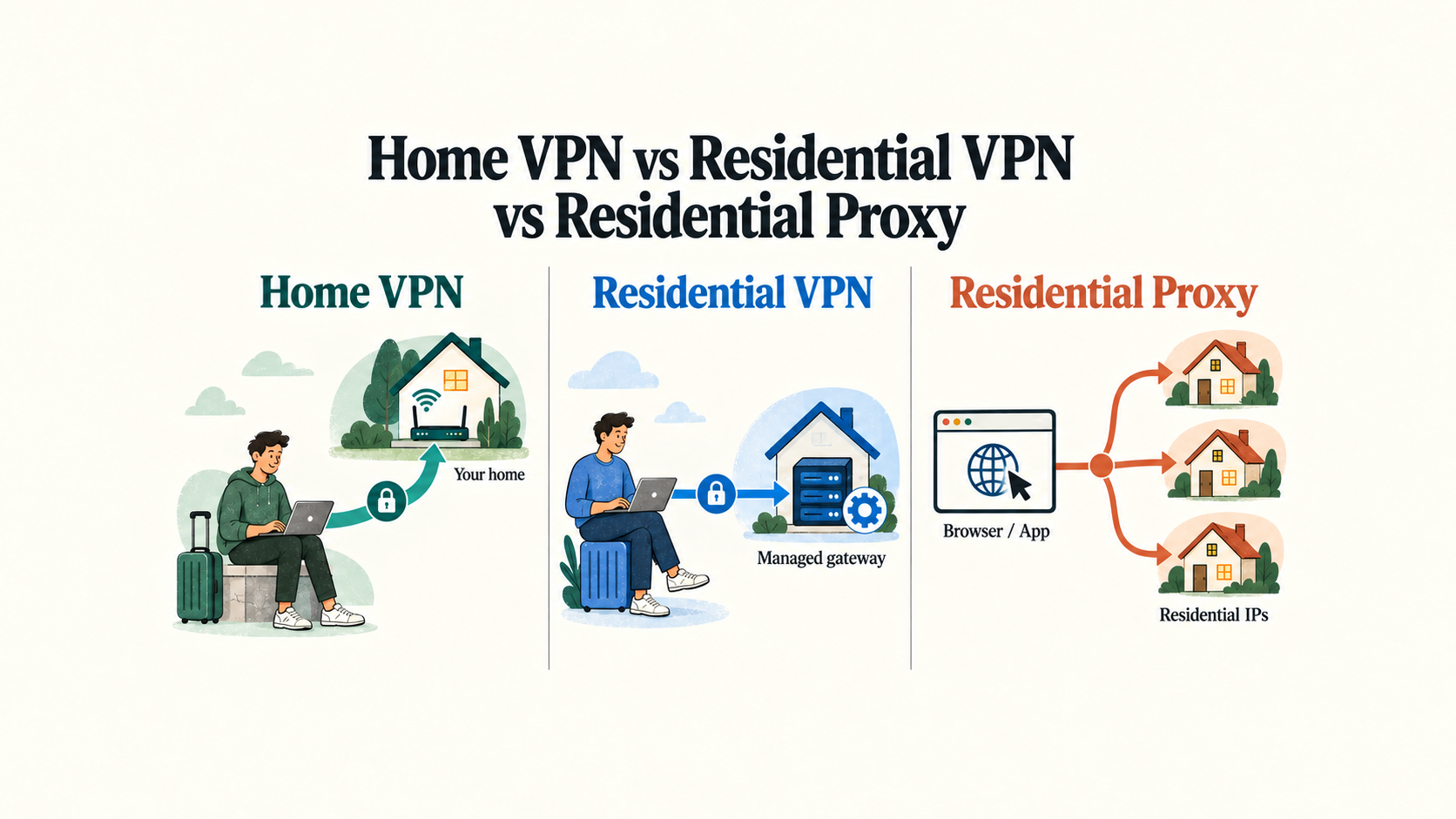
A home VPN sends your traffic back through your own home internet connection.
A residential VPN sends your traffic through a residential connection provided or operated elsewhere.
A residential proxy forwards selected traffic through one or more residential IP addresses, often with much more emphasis on sessions, targeting and IP rotation.
Those differences affect almost everything:
whether you get your exact home IP
whether you need hardware running at home
whether your entire device is tunneled
whether IPs stay consistent or rotate
how much setup is required
how well the system handles travel
what happens when your home internet goes offline
So before comparing brands, it helps to understand the architecture.
The 30-Second Version
FeatureHome VPNResidential VPNResidential ProxyResidential IPUsually your own home ISP IPResidential ISP IP supplied by serviceResidential IP from proxy networkYour exact home IPYesNoUsually noEncrypted VPN tunnelYesYesNot inherently device-wideWhole-device routingYesUsually yesUsually application/session-specificHardware/service needed at homeUsually yesNoNoDepends on your home internetYesNoNoIP persistenceUsually high, subject to ISPDepends on providerSticky or rotatingLarge IP rotationNoUsually not the goalCommonBest fitUsing your actual home connection remotelyStable residential connectivity without home infrastructureAutomation, testing, data workflows and scalable residential IP access
These are general patterns rather than universal laws.
A residential proxy can have a long-lived sticky session.
A residential VPN can rotate endpoints.
A home ISP can change your public IP.
But the table captures the basic design philosophy.
What Is a Home VPN?
A home VPN turns a device on your own home network into the endpoint that remote traffic uses.
That device could be:
a VPN-capable router
a mini PC
a Raspberry Pi
a NAS
a server
another always-on device
Imagine you live in Miami but travel to Mexico.
Your connection might look like:
Laptop in Mexico → encrypted VPN tunnel → your Miami home → internet
The website you visit sees the public IP address assigned to your Miami home internet connection.
That is the defining advantage.
You aren't just receiving a residential IP.
You are routing through your residential connection.
Why Would Someone Want Their Exact Home IP?
Sometimes the exact connection matters more than merely having a residential-class IP.
A home VPN can be useful when you want:
your normal home public IP while away
remote access to devices on your home LAN
access to a NAS or home server
a network endpoint you fully control
continuity with services normally used from home
your own residential ISP connection rather than a provider's location
That makes home VPNs particularly interesting for travelers and technically comfortable remote workers.
But there is an important tradeoff:
Your house becomes infrastructure.
The Biggest Weakness of a Home VPN
For the remote VPN to work, the home side has to work.
That normally means you depend on:
Home electricity
↓
Home modem/router
↓
Home internet service
↓
VPN server
↓
Reachable networking configuration
If your home ISP goes down, the VPN goes down.
If the router crashes, the VPN goes down.
If somebody unplugs the equipment, the VPN goes down.
And depending on your ISP, CGNAT can make traditional inbound VPN connections more difficult because your router may not have a publicly reachable IPv4 address.
That does not make a home VPN a bad design.
It simply means you are operating part of the infrastructure yourself.
Home VPN Speed Depends Heavily on Your Home Upload
This is another major difference.
Suppose your home connection is:
500 Mbps download / 20 Mbps upload
You might initially think:
Great — I have 500 Mbps internet.
But when you are abroad routing traffic through your house, the home's upload capacity becomes extremely important because data has to travel back out of the home connection toward you.
The route can become:
Website → home internet → VPN tunnel → traveler
A very fast home download speed therefore does not guarantee an equally fast home VPN.
Distance also adds latency.
A traveler in Georgia connecting to a home in Florida has a very different network path from someone in Thailand connecting to the same Florida house.
What Is a Residential VPN?
A residential VPN keeps the VPN model but changes whose residential connection acts as the endpoint.
Instead of routing through your house:
Traveler → encrypted VPN → your home → internet
you might have:
Traveler → encrypted VPN → residential VPN gateway → internet
The residential gateway uses an IP associated with residential internet service rather than a conventional datacenter exit.
Our live What Is a Residential VPN? Residential VPN vs Regular VPN Explained guide goes deeper into the different ways providers build these networks. OurVPNs
The Key Difference: Home VPN vs Residential VPN
Both can result in internet traffic exiting through residential broadband.
But:
Home VPN
Uses your home internet connection.
Residential VPN
Uses a residential internet connection supplied through the service.
That one distinction explains most of the practical differences.
With a home VPN
You control the home endpoint, but you are responsible for keeping it alive.
With a residential VPN
The provider operates the endpoint, but it isn't your personal home connection.
Neither architecture is universally better.
They solve slightly different versions of the same problem.
What Does a Residential VPN Remove From the Equation?
A managed residential VPN generally means you do not need to maintain:
a VPN server at your house
a home-side router specifically for remote access
inbound port forwarding
a public home IPv4 address
an always-on home computer
remote troubleshooting of your own home hardware
It also means a power failure or ISP outage at your personal residence does not automatically take down your VPN.
Of course, the provider's residential endpoint can still have connectivity problems.
The difference is simply who operates and maintains that infrastructure.
But a Residential VPN Does Not Give You Your Home IP
This distinction is easy to miss.
Suppose:
Your house in Miami uses IP A.
A residential VPN gateway elsewhere in Miami uses IP B.
Both may be:
residential
geographically close
associated with consumer ISPs
But they are still different public IP addresses.
If your requirement is:
“I need the exact connection assigned to my house.”
then a residential VPN does not replace a home VPN.
If your requirement is:
“I need a stable residential connection in the location I need.”
then a managed residential VPN may remove a lot of unnecessary home infrastructure.
What Is a Residential Proxy?
A residential proxy solves a different problem.
Instead of creating a VPN tunnel for your entire device or network, a proxy usually acts as an intermediary for selected application traffic.
For example:
Browser / app / script → residential proxy → website
The website sees the residential proxy IP rather than your original one.
Residential proxy providers frequently emphasize features such as:
large IP pools
country targeting
city targeting
ISP targeting
rotating sessions
sticky sessions
multiple simultaneous identities
request-level control
That makes them especially useful for legitimate activities such as localized website testing, market research, ad verification and authorized public-web data collection.
Large proxy providers describe residential proxies around this intermediary model using ISP-assigned residential addresses. Oxylabs
A Residential Proxy Is Not Just a Residential VPN Without an App
This is where people often get confused.
Suppose your laptop is running:
Chrome
Slack
Zoom
email
cloud storage
operating-system services
A VPN can potentially route:
Everything → VPN tunnel → residential endpoint
A browser proxy might instead route:
Chrome → proxy → residential endpoint
while:
Slack → normal internet
Email → normal internet
Operating system → normal internet
There are system-wide proxy configurations and more advanced proxy clients, so the boundary is not absolute.
But conceptually:
VPNs operate naturally as network tunnels.
Proxies operate naturally as intermediaries for selected traffic.
Our existing Residential VPN vs Residential Proxy: What's the Difference? guide goes much deeper specifically on that two-way comparison. OurVPNs
What About Encryption?
A home VPN and a residential VPN normally use VPN protocols to establish an encrypted tunnel between the client and VPN endpoint.
Common examples include:
WireGuard
OpenVPN
A residential proxy should not automatically be assumed to provide the same device-wide encrypted tunnel.
That does not mean all proxy traffic travels across the internet completely unencrypted.
If you visit an HTTPS website through a proxy, HTTPS still protects the appropriate portion of that connection.
Proxy protocols and deployments also vary.
The important distinction is that a proxy itself is not inherently equivalent to a full-device VPN tunnel.
If you are deciding which VPN protocol to use, our verified OpenVPN vs WireGuard comparison covers those two protocols directly. OurVPNs
Home VPN vs Residential VPN vs Residential Proxy: The Architecture
This is easiest to understand visually.
Home VPN
Your device
↓
Encrypted VPN tunnel
↓
Your home router/server
↓
Your home ISP
↓
Internet
Result:
Websites see your home's public IP.
Residential VPN
Your device
↓
Encrypted VPN tunnel
↓
Managed residential gateway
↓
Residential ISP
↓
Internet
Result:
Websites see the residential VPN endpoint's public IP.
Residential Proxy
Application / browser / script
↓
Proxy service
↓
Residential IP
↓
Internet
Result:
That proxied traffic appears from the selected residential proxy address.
Three similar-looking outcomes.
Three different systems underneath.
Which One Gives You the Most Consistent IP?
It depends.
Home VPN
Often very consistent because you keep exiting through your home connection.
But your ISP may still assign a dynamic IP and occasionally change it.
Residential VPN
Can be highly consistent if the provider assigns a persistent or dedicated residential endpoint.
Other residential VPN models may rotate.
Residential Proxy
Can range from:
IP changes every request
to:
sticky IP for an extended session
to:
static ISP/residential-style proxy
So do not treat:
residential
as a synonym for:
static
or:
dedicated.
Those terms describe different properties.
Our Dedicated IP vs Static IP vs Residential IP guide explains this distinction in more detail. OurVPNs
Which Is Best for Travel?
This depends on what you want to preserve while traveling.
Choose a home VPN when:
Your requirement is specifically:
“I want my internet traffic to keep exiting through my own house.”
That can make a lot of sense if:
your home connection is reliable
upload speed is adequate
you can reach the VPN server remotely
somebody can troubleshoot hardware if necessary
you want access to home-network resources too
Choose a residential VPN when:
Your requirement is more like:
“I want a persistent residential connection in a particular available location without maintaining equipment at my house.”
That can reduce operational complexity.
Choose a residential proxy when:
Your requirement sounds like:
“I need particular applications or sessions to use residential IPs, potentially across many addresses or regions.”
That is a different travel use case from putting your entire laptop or router behind one stable connection.
What If You Travel With Multiple Devices?
This is where VPN architecture has another advantage.
Suppose you have:
laptop
phone
tablet
streaming device
With a VPN-capable travel router, you can potentially create:
Laptop ─┐
Phone ──┤
Tablet ─┼→ Travel router → VPN → residential/home endpoint
TV ─────┘
Now one network device maintains the VPN rather than configuring every application separately.
This can work with either:
a home VPN
or:
a residential VPN
depending on where the tunnel terminates.
For the router side of the decision, see our verified VPN Router vs VPN App: Which Setup Is Better? guide. OurVPNs
Reliability: Who Owns the Failure Point?
This is one of the most useful ways to compare the three.
Home VPN
You own most of the infrastructure.
Potential failure points include:
Your home electricity
Your ISP
Your modem
Your router
Your VPN server
Port forwarding / NAT
Your remote client
Maximum control comes with maximum responsibility.
Residential VPN
The provider owns more of the endpoint infrastructure.
Potential failure points include:
Your current internet
VPN tunnel
Provider infrastructure
Residential gateway
Residential ISP
You give up some control in exchange for not maintaining the home endpoint.
Residential Proxy
The proxy provider operates the residential proxy infrastructure.
Your application needs to maintain:
Proxy authentication
Proxy session
Targeting configuration
Rotation/sticky-session rules
Reliability becomes more about proxy-network quality and session behavior than keeping a VPN endpoint online.
What Happens When Your Home Internet Goes Down?
This question sharply separates home VPNs from the other two.
With a home VPN:
Home internet offline = home VPN unavailable.
Your VPN server may be perfectly healthy, but it has no internet path.
With a managed residential VPN:
Your personal home connection is irrelevant because the service exits elsewhere.
With a residential proxy:
Your own home internet also has nothing to do with the proxy's residential exit pool.
This is why frequent travelers should think about failure recovery, not just the happy path.
A home VPN can be excellent.
But if you rely on it professionally from another continent, ask yourself:
Who resets the router if something goes wrong?
What About CGNAT?
CGNAT mainly matters to the home VPN architecture.
Traditional remote WireGuard configurations often expect the home endpoint to be reachable from the internet.
If your ISP places you behind Carrier-Grade NAT, ordinary port forwarding may not solve that problem.
Alternatives include:
obtaining a public IP from the ISP
Tailscale
IPv6
relay infrastructure
a VPS intermediary
managed home-IP systems
A residential VPN or residential proxy usually avoids this particular problem because you are not trying to expose a server through your own home ISP connection.
Which Is Better for Remote Work?
There is no universal answer.
For authorized remote work where the objective is stable connectivity:
Home VPN
Makes sense when maintaining your actual home connection is the requirement.
Residential VPN
Makes sense when you need residential connectivity but do not want your house functioning as a production VPN server.
Residential Proxy
Usually makes less sense for routing an employee's complete everyday device connection because that is not the design problem most residential proxy products are built around.
Whatever architecture you use, remember that an IP address is only one network signal.
A VPN or proxy does not automatically change:
GPS
Wi-Fi-based positioning
device management
browser permissions
account history
endpoint security
time-zone configuration
other application-level signals
Use remote-access tools only where they comply with the applicable organizational policies.
Which One Is Better for Automation and Web Data?
This is the category where residential proxies become much more attractive.
Imagine a legitimate testing workflow requiring:
Miami → request
Dallas → request
Chicago → request
Los Angeles → request
and perhaps thousands of authorized requests across many sessions.
A home VPN is a poor fit.
It gives you:
Your house.
A persistent residential VPN may also be a poor fit.
It intentionally gives you:
One or a small number of consistent residential locations.
Residential proxy networks are designed much more naturally for:
address pools
rotation
session management
geographic selection
many parallel connections
That is exactly why more IPs is not always better.
It depends on the job.
Which One Is Better for Keeping the Same Identity?
Now reverse the requirement.
Suppose you want:
Monday → same location
Tuesday → same location
Wednesday → same location
and you do not want:
Request 1 → IP A
Request 2 → IP B
Request 3 → IP C
Then the giant rotating proxy pool becomes much less attractive.
A home VPN naturally provides continuity through your home network.
A persistent residential VPN can similarly prioritize continuity.
The product with ten million available residential IPs may be technically impressive while solving the opposite problem from the one you have.
Home VPN vs Residential VPN: Which Gives You More Control?
A home VPN generally wins on infrastructure ownership.
You can choose:
hardware
operating system
VPN protocol
firewall
DNS
routing
logs
updates
ISP
physical location
But you also have to maintain all of it.
A managed residential VPN shifts that responsibility toward the provider.
That is the classic tradeoff:
DIY control vs managed convenience.
Neither should automatically be interpreted as better security or better reliability.
Execution matters.
Residential VPN vs Residential Proxy: Don't Duplicate the Question
If your decision is already narrowed down to only these two options, we have a separate article dedicated entirely to that comparison:
Residential VPN vs Residential Proxy: What's the Difference?
That article goes deeper into:
application vs network routing
encryption differences
rotating vs persistent IPs
proxy sessions
proxy sourcing
automation use cases
everyday VPN use
This article's bigger question is different:
Do you want your own house, somebody else's managed residential connection, or a pool of residential proxy endpoints?
Where OurVPNs Fits
OurVPNs fits into the managed residential VPN category.
The service is not designed to route your traffic back through a router sitting inside your personal house.
It also is not designed as a massive rotating residential proxy network.
The architecture is closer to:
Your device or travel router
↓
Encrypted VPN tunnel
↓
Managed residential gateway
↓
Residential broadband connection
↓
Internet
That is useful when the requirement is a persistent residential connection without maintaining a VPN endpoint at home.
It is not the same thing as your actual home IP.
If your exact home connection is essential, a home VPN is the more direct architecture.
And if your objective is large-scale rotating residential IP access, a residential proxy service is the more appropriate category.
The product should match the problem.
FAQ
Is a home VPN the same as a residential VPN?
No.
A home VPN normally routes traffic through your own home internet connection.
A residential VPN routes traffic through a residential connection supplied through the VPN service.
Both may ultimately exit through residential ISP networks, but they are not the same architecture.
Does a home VPN give me my real home IP?
Generally, yes.
If the VPN tunnel sends internet traffic out through your home connection, websites see the public IP currently assigned to that connection.
If your ISP changes that address, the visible IP can change too.
Does a residential VPN give me my own home IP?
No, unless the service is specifically built around your personal home connection.
A normal managed residential VPN supplies another residential endpoint.
Is a residential proxy the same as a VPN?
No.
A proxy forwards selected traffic through an intermediary.
A VPN normally establishes an encrypted network tunnel that can route traffic for an entire device or network.
Which option is easiest to maintain?
A managed residential VPN is usually simpler than self-hosting a home VPN because you do not need to maintain the home-side server.
A residential proxy can also require little local infrastructure, but its configuration model is different and may be more appropriate for applications and sessions than ordinary whole-device connectivity.
Can I use a travel router with a home VPN?
Yes.
A common configuration is:
Devices → travel router → VPN tunnel → home VPN server → internet
The travel router acts as the client while the VPN endpoint remains at your house.
Can I use a travel router with a residential VPN?
Yes, when the provider supplies a protocol supported by the router.
Then the route can become:
Devices → travel router → residential VPN → internet
Which option works best behind CGNAT?
CGNAT is mainly a challenge when hosting a VPN server at home.
Tailscale, relays, IPv6 or a public IP from the ISP can help.
Managed residential VPNs and residential proxies do not normally require you to expose a server through your own home connection.
Which one is best for rotating IPs?
Residential proxies are normally the most natural option when rotation and large IP pools are central requirements.
Which one is best for one stable residential connection?
A home VPN naturally provides your home connection, while a persistent residential VPN can provide a managed residential endpoint.
Which is appropriate depends on whether you need your exact house or simply a stable residential location.
The Bottom Line
Home VPNs, residential VPNs and residential proxies can all produce something that looks similar at first:
Traffic exits through a residential IP.
But the similarity ends there.
A home VPN says:
Route me through my house.
A residential VPN says:
Route my device or network through a managed residential connection.
A residential proxy says:
Route selected application traffic through residential IP addresses, potentially across many sessions and locations.
If you need your exact home connection, build or buy a home VPN setup.
If you want managed residential connectivity without depending on your house, consider a residential VPN.
If you need IP pools, session controls and rotation at scale, look at residential proxies.
The right question is not:
“Which technology is best?”
It is:
“Which network architecture actually matches what I'm trying to accomplish?”
Once you answer that, the differences stop being confusing.