Router vs VPN vs VPN Router: What's the Difference?
Two people walk into the same hotel room.
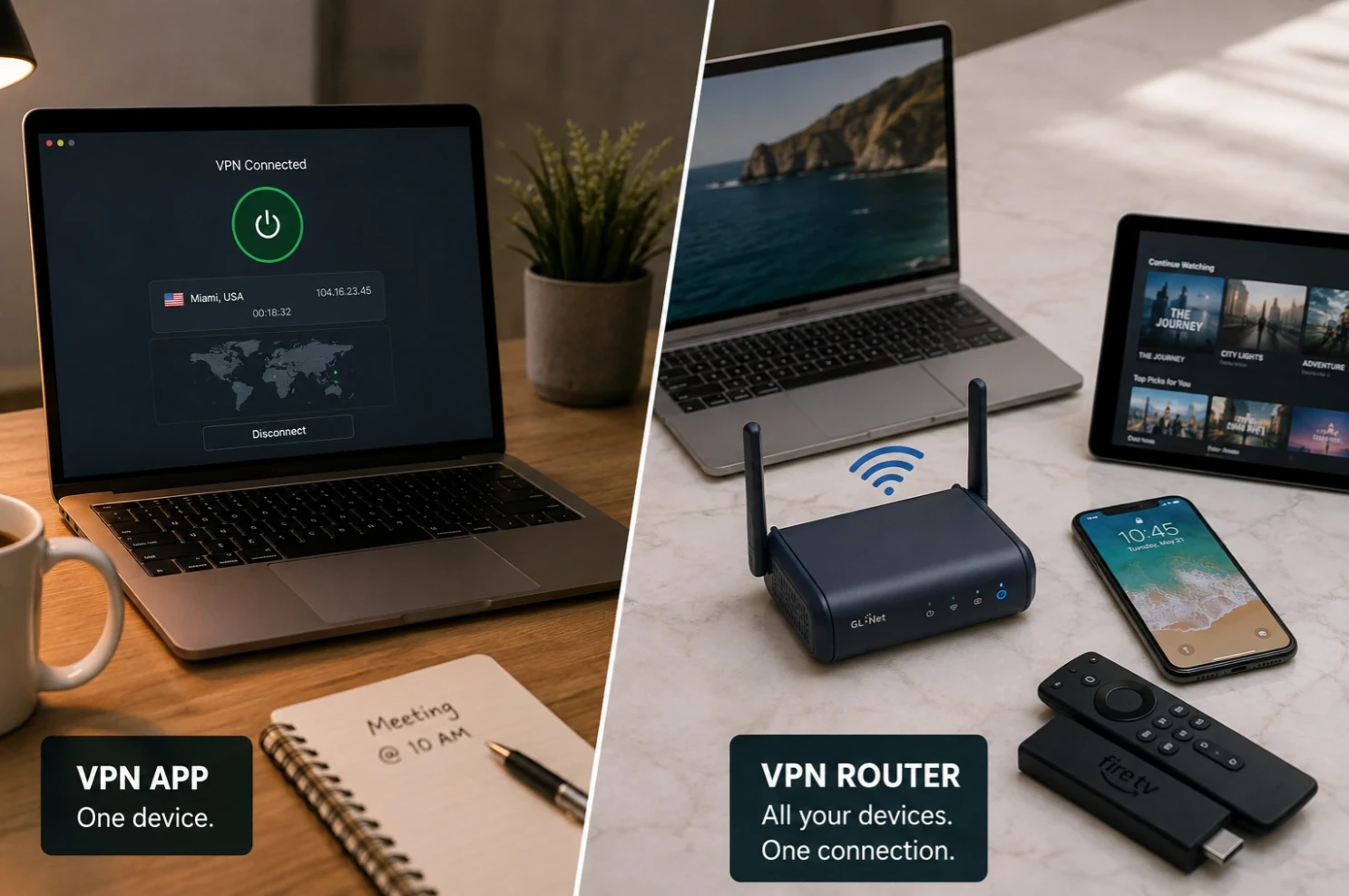
Traveler #1 connects a laptop to the hotel Wi-Fi, opens a VPN app and connects. Then comes the phone. Then the tablet. Maybe there is another laptop.
Traveler #2 powers on a small travel router. The laptop, phone and tablet automatically connect to that router, and the router handles the VPN connection for all of them.
Both setups can ultimately route traffic through a VPN. But underneath, they work very differently. One puts the VPN inside the device. The other puts the VPN inside the network. That distinction gets surprisingly important once you start dealing with managed work laptops, multiple devices, smart TVs, Ethernet connections, travel networks and kill switches.
So, VPN router or VPN app? There is no universal winner, but there are situations where one makes a lot more sense than the other.
Router vs VPN: the 30 second answer
A router is the box that connects your devices to the internet and to each other. A VPN is a service that encrypts your traffic and sends it out through another location, so websites see that location's IP instead of yours. They do different jobs, so you don't pick one or the other. A VPN router is simply a router with the VPN built in: every device on its Wi-Fi goes through the VPN without installing anything. The rest of this guide covers when that beats a VPN app on each device.
A VPN app is usually better when you mainly use one device, want the simplest setup, frequently switch VPN servers, need a VPN on cellular data, or want different VPN settings on different devices.
A VPN router becomes attractive when you use several devices, cannot install VPN software on one of them, have a corporate-managed laptop, use TVs or consoles without VPN apps, want centralized kill-switch protection, want Ethernet devices behind the VPN, travel frequently, or want the VPN to run independently of your laptop. For TVs and consoles at home, our guide to a whole home VPN router shows how one box covers every screen.
And for plenty of people, the best answer is both. Use the router when you're connected to your own network and keep a VPN app available for when the router isn't with you.
First, What Does a VPN App Actually Do?
With a normal VPN application, the tunnel begins on your device. Laptop, then VPN tunnel, then VPN endpoint, then internet. The laptop itself runs WireGuard, OpenVPN or another protocol and changes its own network routing accordingly, using WireGuard's peer-based routing model or OpenVPN's full-tunnel client routing, depending on which one you're running.
The protocol isn't the important part. Where the VPN begins is. With an app, your laptop is responsible for maintaining its own connection, and nothing else inherits it. Not your phone, not your TV, not the second laptop sitting right next to it.
What Changes When the VPN Is on a Router?
Move the VPN client onto a router and the architecture flips. Instead of laptop to VPN, you get laptop to router to VPN, and now every other device connected to that router can use the same tunnel too.
Compatible routers can establish the VPN connection themselves and route every connected client through it. GL.iNet's router software, for example, supports router-level VPN tunnels along with policy-based routing and kill-switch behavior. From the laptop's perspective, it can simply look like "I'm connected to Wi-Fi." The router is doing the interesting stuff behind the curtain.
A Big Advantage: When You Can't Install a VPN App
This is one of the biggest reasons to consider a VPN router, and it gets surprisingly little attention.
Sometimes you just can't install VPN software on the computer. Corporate-managed laptops are the classic case. Organizations can use tools like Microsoft's App Control for Business to restrict which applications run on managed Windows devices, and Apple documents similar controls over system extensions, including network extensions, on managed Macs. You may have a completely legitimate need for a VPN and simply lack the admin rights to install one.
A router changes the problem. Instead of needing an installed VPN client on the laptop, you get: managed laptop, then Wi-Fi or Ethernet, then VPN router, then VPN. No third-party VPN application necessarily needs to touch the laptop at all.
An important limitation. A router is not a way to disable or defeat corporate device management. Management software, endpoint security and browser policies on the computer keep operating normally, and your organization may still have its own rules about which networks or VPNs you're allowed to use. The advantage here is architectural: the VPN can exist outside the computer instead of requiring software installed inside it, which is genuinely useful even outside corporate environments, since it also means the laptop doesn't need to run a VPN app, maintain its own kill switch, or reconnect its own tunnel every time the network changes. The router just handles the networking.
Smart TVs, Streaming Boxes and Consoles
Here's where routers really earn their keep. Plenty of connected devices, smart TVs, streaming boxes, consoles, random IoT gadgets, either don't support a real VPN client or make installing one painful. A router handles it for them. The TV doesn't need to understand WireGuard. It just sees a normal router, while the router itself sees the VPN tunnel. If it's a Fire TV you're trying to cover, our guide on how to install a VPN on a Firestick compares both routes model by model.
Is a Router VPN Harder for an App to Detect?
There's a nuance worth being precise about. When a VPN runs directly on a computer, the OS has explicit VPN components to inspect, an app, a network interface, a config file. When the VPN sits on an external router, the device connected to it may just see a normal gateway with nothing local to inspect.
That does not make the connection an undetectable VPN. The website or service on the other end still sees the same public exit IP either way. So there are really two separate questions: can the device itself see local VPN software running, and what does the online service think about the public IP it receives. Moving the tunnel to the router only changes the first question. The type and reputation of the exit address is what answers the second, which is exactly where residential VPNs come in.
This Is Where Residential VPNs Get Interesting
A traditional VPN usually exits through hosting or VPN-server infrastructure. A residential VPN exits through an actual residential internet connection instead. With a router-level residential setup, that looks like laptop, then travel router, then encrypted tunnel, then residential VPN gateway, then residential ISP, then internet. The laptop never has to run the VPN client itself, and your traffic still exits through the residential connection you picked.
That's a very different architecture from installing a commercial VPN app and picking a server off a giant list. If the terminology is new, start with What Is a Residential VPN? and Residential IP vs Datacenter IP vs ISP IP.
Router Kill Switch vs Device Kill Switch
This might be the strongest security argument for going router-level.
A device kill switch can be excellent, but it only protects the device it's running on. If you're carrying two laptops, a phone and a tablet, that's four separate kill switches that all need to be configured correctly. A router-level kill switch enforces the rule for the whole network at once. GL.iNet's Enhanced Kill Switch, for instance, can force every connected device onto the VPN tunnel and block anything that doesn't match it, and its VPN client profile documentation describes cutting off local internet access entirely if the VPN connection fails unexpectedly.
A simple way to remember it: a device kill switch protects a device, a router kill switch can protect a network.
Is that automatically more secure? Not in every setup, but it can be more robust and more centralized, since the enforcement doesn't depend on the laptop's own software. If the laptop crashes, sleeps, restarts, or the VPN app just gets closed, the router can keep enforcing its policy regardless, because nothing about it depends on that laptop staying alive. That said, a badly configured router is still a badly configured router. Putting antennas on the problem doesn't make it disappear. Test the actual failure behavior with our VPN Kill Switch Guide before you trust it.
Multiple Devices, and Switching Servers
The more devices you're carrying, the stronger the router argument gets. Configure it once, connect everything to it, and modern router platforms like GL.iNet's VPN dashboard can even apply different policies per device (work laptop through the VPN, TV on regular internet) instead of forcing everything through one tunnel.
Where the app wins is convenience. If your provider offers a dozen server locations and you switch between them constantly, opening an app and clicking a new city beats digging into a router's admin panel every time. If you keep one stable dedicated endpoint, this barely matters. If you hop through fifteen locations before lunch, the app wins outright.
Travel Changes the Equation
This is where a small travel router earns its keep. Your laptop, phone and tablet all remember one network name. What that router is plugged into upstream can change constantly, hotel Wi-Fi today, an Airbnb tomorrow, Ethernet next week, phone tethering after that, and your devices never notice, because they're still just talking to the same router. GL.iNet supports repeater mode for joining an existing Wi-Fi network and can use a tethered phone as an internet source too. It's one of those features that sounds unremarkable until you're standing in a hotel room typing the same fourteen character Wi-Fi password into four different devices. Then it's suddenly genius. If you're shopping for one, our guide to the best travel router for a VPN compares the models worth buying.
Hotels also love captive portals. Connect to Wi-Fi, get no internet, open a browser, enter your room number, accept some terms, maybe sacrifice a small goat, and eventually get online. GL.iNet documents connecting through captive portals directly, which means you do that dance once, on the router, instead of once per device.
Ethernet deserves a mention here too. If you've got a wired connection available, a device plugged into the router by cable still gets the router-level VPN, which is genuinely nice in hotels, offices and anywhere the Wi-Fi is congested.
Which Is Faster?
Neither one automatically. Performance depends on your internet connection, the Wi-Fi or Ethernet link, whichever device or router is doing the encryption, the protocol, and the route to the endpoint. A powerful laptop can handle encryption easily. A capable router can too. A weak router becomes the bottleneck. Don't assume hardware beats software or the other way around. Test your actual setup.
WireGuard, OpenVPN or Stealth on the Router?
OurVPNs supports all three on routers, and either can work well at the router level if the router itself supports them. WireGuard leans on a simpler, peer-based architecture. OpenVPN is more configurable and supports both full and split tunneling. We already wrote a whole comparison, so rather than turning this into Lord of the Rings: Return of the Routing Table, see OpenVPN vs WireGuard: Which Protocol Should You Choose?
Stealth Mode on a Router: For Countries That Block VPNs
Regular WireGuard and OpenVPN are easy to spot. In countries like China, the UAE, Turkey and Russia, the local network can recognize them and cut them off, which turns a nice travel router into a very expensive paperweight.
Stealth mode fixes that. It uses VLESS + REALITY + XTLS Vision and Hysteria2, protocols designed to look like ordinary web traffic, and OurVPNs runs it on our routers as well as on devices. Put it on the router and every device behind it is covered, including the phone, the work laptop and the TV, without installing a single specialized app on any of them. Your traffic still exits through the same residential connection you picked.
As of October 2026 we have tested it working from China, the UAE, Turkey and Russia, and it is included on every plan. Censors change their methods often, so we keep testing. VPN rules also differ by country, so check the local law before you travel.
Router-Level Split Tunneling
A VPN router doesn't have to mean every single device uses the VPN. Policy routing can send some devices or traffic one way and everything else another way, work laptop and phone through the VPN, TV on the regular connection, or certain destinations tunneled while everything else goes direct. GL.iNet's firmware supports exactly this kind of policy mode, which gives a router a lot more flexibility than people expect going in.
More Power Means More Ways to Mess It Up
A VPN app is usually just connected or disconnected. A router can involve VPN profiles, kill switch rules, per-device policies, DNS settings, IPv6 handling, Wi-Fi repeater settings, guest networks and split tunneling. That's powerful, and it's also a lot more surface area to misconfigure. If your router says VPN Connected, that is not the same thing as a passed audit. Test it with our Complete VPN Leak Testing Guide, covering IPv4, IPv6, DNS, WebRTC, failure behavior, startup, sleep and wake, and network switching. Trust, but verify, preferably before the Zoom meeting.
What About IPv6?
OurVPNs currently runs an IPv4-only VPN configuration. That means the real question isn't whether the router picks up an OurVPNs IPv6 address, it's whether your physical ISP's native IPv6 connection can sneak around the VPN entirely. You want IPv4 going through the OurVPNs tunnel and your ISP's native IPv6 blocked or unavailable, not IPv4 protected while IPv6 quietly goes straight to your ISP. This applies whether the VPN is running on a laptop or a router, and it's exactly what our VPN Leak Test Guide checks for.
Can You Use a Router VPN and an App Together?
Yes, and there are two ways it goes.
The useful way: at the hotel, laptop through the VPN router. Away from the hotel, laptop through the VPN app instead. Network-level protection when the router is available, device-level when it isn't.
The accidental way: you connect to the VPN router, then also switch on a full VPN on the laptop, and now you've got two tunnels stacked on top of each other without meaning to, more routing complexity, more encryption overhead, another layer to troubleshoot. Two padlocks don't necessarily mean twice the protection. Sometimes they just mean the printer stopped working.
VPN Router vs VPN App: The Scorecard
One personal laptop: VPN app
Smartphone on cellular: VPN app
Can't install VPN software: VPN router
Corporate managed laptop, external VPN permitted: VPN router
Several devices: VPN router
Smart TV, console or IoT device: VPN router
Easy server switching: VPN app
Centralized kill switch: VPN router
Ethernet connected devices: VPN router
Hotel with several devices: VPN router
Country that blocks VPNs, several devices: VPN router with Stealth
Traveling with only a phone: VPN app
Dedicated stable VPN location: VPN router
Per device customization: VPN app
Network wide VPN policy: VPN router
Maximum flexibility: both
The Biggest Difference Isn't Hardware vs Software
A VPN app makes the VPN a feature of the device. A VPN router makes the VPN a feature of the network. That's really the whole decision. Putting a VPN on one laptop is easy. It's once you're thinking "I want every device on this network to use this connection," or "I can't install VPN software here," or "I want one kill switch controlling everything," or "this TV couldn't install WireGuard if its life depended on it," that the router starts looking a lot more attractive.
Our Practical Recommendation
Single device, use the app. Several devices, or devices that can't run a VPN client, use a compatible router (here's how to set up a VPN on your router, or skip that step with one of our preconfigured router kits). Want a stable dedicated residential connection across everything you own, the router keeps that endpoint tied to the network instead of to whatever software happens to be running on each device. Frequent traveler, carry the router when it's practical and keep a device VPN as backup for when it isn't. Heading somewhere that blocks VPNs, set the router to Stealth before you leave.
Whichever you pick, test it. Public IPv4, IPv6 bypass, DNS, WebRTC, kill switch behavior, startup, sleep and wake, network switching. Connected is a status message, not an audit report.
Final Thought
VPN apps and VPN routers aren't really competing technologies. They're two different places to put the same job. With an app, the device controls the VPN. With a router, the network does. For one device, the app is wonderfully simple. For multiple devices, managed endpoints, TVs, consoles, centralized kill switches, travel setups and dedicated residential connections, moving the VPN onto the router solves problems an app just can't.
Look at your own setup. If the VPN belongs to one device, start with the app. If it belongs to everything connected around you, the router probably deserves the job. And if your backpack has enough electronics that TSA starts looking impressed instead of suspicious, yeah, get the router. Like to tinker? A Raspberry Pi can do the router's job too; here's how to set one up as a WireGuard client.
Continue Reading
VPN Leak Test: IP, DNS, IPv6 & WebRTC
VPN Kill Switch Guide
OpenVPN vs WireGuard
How to Set Up WireGuard
How to Work Remotely From Abroad
Digital Nomad Connectivity Guide
How to Hide Your Laptop Location on Windows & Mac
What Is a Residential VPN?
Residential IP vs Datacenter IP vs ISP IP
Dedicated IP vs Static IP vs Residential IP