Residential VPN vs Residential Proxy: What's the Difference?
You need a residential IP address. You start searching. Within a few minutes you are staring at products that sound almost identical: a residential VPN, a residential proxy, and somebody on a forum insisting you should just run a VPN back to your own house.
All three can route your traffic through a home style IP. All three make a website see a different address than the one your hotel or coffee shop gave you. And that is about where the similarity ends.
Underneath, they are built for very different jobs. So the real question is not "which one is better?" It is "what am I actually trying to do?"
The 30 second answer
A residential VPN is usually the better fit when you want:
an encrypted tunnel for your whole device, or your whole network via a router
one persistent residential location that stays put
normal everyday use on a laptop, phone or travel router
WireGuard, OpenVPN or a stealth protocol
nothing running at your house
A residential proxy is usually the better fit when you need:
large pools of residential IPs
IP rotation, per request or per session
country, city or ISP targeting at scale
routing for one app, browser or script
authorized data collection, localized testing or automation
A home VPN (a VPN back to your own house) is the better fit when you need your exact home IP and your house can stay online while you are away.
"Residential" and "VPN" describe two different things
This clears up most of the confusion.
In "residential VPN," the word residential describes the kind of IP at the exit. The word VPN describes how your traffic gets there. Same with "residential proxy": residential is the type of exit IP, and proxy is how traffic is routed through it.
A residential proxy is an intermediary that uses an IP an ISP assigned to a home device. A VPN builds an encrypted tunnel between your device and the endpoint, and encryption is a core part of how it works. These are not competing definitions. They describe different layers, and that matters once you look under the hood.
How each one works
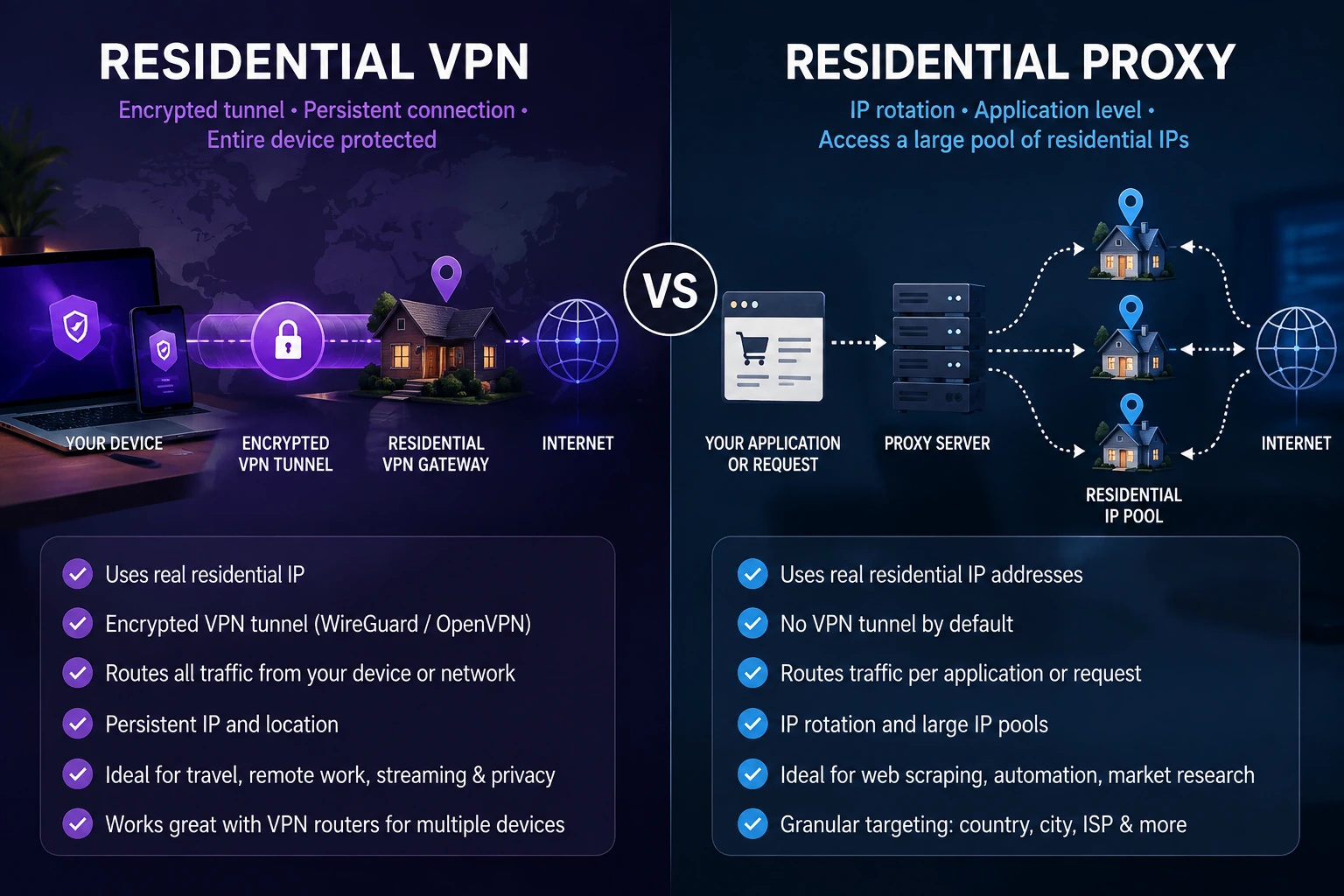
Residential VPN. Your laptop, then an encrypted tunnel, then a residential VPN gateway, then a residential ISP, then the internet. Websites see the residential IP instead of your hotel, Airbnb or hotspot. The tunnel can start on your device, or on a travel router so the laptop does not need any VPN software at all. It behaves like a network connection, not a tweak to one browser.
Home VPN. Your laptop, then an encrypted tunnel, then a router or server in your own house, then your home ISP, then the internet. Websites see your home's IP. You are not getting a residential IP. You are getting yours.
Residential proxy. A browser, app or script, then the proxy service, then a residential IP, then the website. That proxied traffic shows up from the residential address. Proxy networks are usually built around something VPN users do not want: lots and lots of IP addresses, with menus to pick country, region, city, ISP and session, and to rotate on a timer or with every request.
Three similar looking outcomes. Three very different systems underneath. One values rotation. The others value consistency.
Home VPN vs residential VPN vs residential proxy, side by side
Home VPN
Exit IP: your own home ISP address.
Your exact home IP: yes.
Encrypted tunnel: yes.
Whole device routing: yes.
Hardware needed at home: yes.
Depends on your home internet: yes.
IP consistency: usually high, unless your ISP changes it.
Best for: using your actual home connection from far away.
Residential VPN
Exit IP: a residential ISP address supplied by the service.
Your exact home IP: no.
Encrypted tunnel: yes.
Whole device routing: usually yes, and router friendly.
Hardware needed at home: no.
Depends on your home internet: no.
IP consistency: depends on the provider, can be dedicated and persistent.
Best for: one stable residential connection without home equipment.
Residential proxy
Exit IP: a residential address from a proxy network.
Your exact home IP: no.
Encrypted tunnel: not inherently.
Whole device routing: usually app or session specific.
Hardware needed at home: no.
Depends on your home internet: no.
IP consistency: sticky sessions or rotating, big pools are common.
Best for: automation, testing, data work and lots of IPs.
These are general patterns, not laws of physics. A proxy can have a long sticky session, a VPN can rotate endpoints, and a home ISP can change your IP. Look past the product name and check how the service actually works.
The biggest difference: network vs application
Here is a useful mental test. Your laptop is running Chrome, Slack, Zoom, email, cloud storage and a pile of background services.
With a full tunnel VPN, everything goes through the tunnel to the residential connection. With a typical proxy, only Chrome might go through the proxy while Slack, email and the operating system keep using the normal internet. If you are choosing between a proxy seller like IPBurger and a VPN, our list of IPBurger alternatives sorted by what you need splits the options this same way.
There are system wide proxy settings and fancier proxy clients, so the line is not absolute. But VPNs naturally act as network tunnels, and proxies naturally act as middlemen for selected traffic. For an ordinary person, that difference is enormous.
What about encryption?
You will often read "VPNs encrypt, proxies do not." That is useful shorthand, but a little too simple.
A VPN is designed around an encrypted tunnel from your device to the endpoint. Proxy encryption depends on the proxy type, the protocol, the app and the settings. Visiting an HTTPS site through a proxy does not make HTTPS disappear. But a residential proxy should not be treated as equal to a full encrypted VPN tunnel, especially on sketchy public Wi-Fi.
Home VPNs and residential VPNs both use VPN protocols such as WireGuard and OpenVPN. Our OpenVPN vs WireGuard comparison covers those two directly.
Home VPN vs residential VPN: the key difference
Both can send your traffic out through home broadband. But a home VPN uses your home connection, and a residential VPN uses a residential connection run by the service. That one difference explains almost everything else.
Why someone wants their exact home IP
your normal home IP while away
access to devices on your home network, like a NAS or home server
an endpoint you fully control
continuity with services you normally use from home
The tradeoff: your house becomes infrastructure.
The weak spots of a home VPN
For the tunnel to work, the home side has to work: home electricity, modem, router, internet service, VPN server and a reachable network setup. If any one of those fails, the VPN fails. Somebody unplugs the router to vacuum, and your workday in Lisbon is over.
Upload speed is the hidden bottleneck. Say your home plan is 500 Mbps down and 20 Mbps up. When you are abroad, every website you load has to come into your house and then go back out to you, so your speed abroad is capped by that 20 Mbps upload, not the 500 down. Distance adds delay too. Connecting from a few states away feels very different from connecting from Thailand.
CGNAT can block it entirely. Many ISPs, plus Starlink and most 5G home internet, put you behind carrier grade NAT, which means your router has no public address that the outside world can reach. Normal port forwarding will not fix that. Workarounds include asking the ISP for a public IP, Tailscale, IPv6, a relay or a small cloud server in the middle. Our guide to home VPNs behind CGNAT walks through them. A residential VPN or proxy avoids the problem entirely, since you are not exposing a server at your own house.
What a residential VPN removes
No VPN server at home, no port forwarding, no public home IP needed, no always on computer, and no remote troubleshooting of your own router from another continent. A power cut at your house does not touch your VPN. The provider's endpoint can still have a bad day. The difference is who has to fix it.
But it does not give you your home IP
Your house uses IP A. A residential gateway across town uses IP B. Both are residential and close by, but they are still different addresses. If you need the exact connection assigned to your house, a residential VPN does not replace a home VPN. If you need a stable residential connection in the location you choose, a residential VPN saves you a lot of hassle.
Persistent vs rotating may matter more than VPN vs proxy
This is one of the most important ideas in the whole article. Imagine two residential services.
Service A: Monday IP #1, Tuesday IP #1, Wednesday IP #1, next month still IP #1.
Service B: request 1 gets IP #182, request 2 gets IP #4,391, request 3 gets IP #78, request 4 gets IP #62,105.
Both may use genuine residential IPs. They solve opposite problems. "Residential," "static," "dedicated" and "rotating" are not synonyms. Our guide to dedicated vs static vs residential IPs explains each.
Some rotating proxies offer "sticky sessions" that hold one address for a window, usually a few minutes to a few hours, before rotating again.
When persistent is the right tool
Logging into accounts. Banks, email and work tools like seeing the same address each visit.
Allowlists. If a system only accepts one approved address, that address has to stay put.
Multi step flows. Checkouts and signups can break if your address changes halfway. Even proxy seller IPRoyal warns against per request rotation for logged in sessions, because rapid location jumps can trigger security blocks.
Travel and remote work. If you just want your usual connection while somewhere else, consistency is the whole point.
When rotating is the right tool
Large scale scraping, where spreading requests across many addresses beats hammering one.
SEO and search monitoring from lots of locations.
Price and market research, so no single address gets rate limited.
Ad verification at scale across regions.
The pricing gives it away
Persistent and rotating options are sold in completely different ways. Bright Data, which sells both, lists static proxies at roughly $0.90 to $2 per IP a month and rotating proxies at $1.50 to $8 per GB. Paying per IP makes sense when you want one address for a long time. Paying per GB makes sense when you move lots of data across lots of addresses. If someone pitches you a per GB rotating proxy for logging into your own bank, the price tag is telling you it is the wrong tool.
What goes wrong with the wrong pick
Rotating for logins: your session looks like several different visitors mid task, which can trigger extra checks or lock you out.
Persistent for scraping: one address making thousands of requests looks nothing like a human, gets rate limited, and takes your one address down with it.
Assuming "residential" tells you everything: it only says where the address lives, not how often it changes. To check where an IP lives, see how to check if an IP is residential, datacenter or ISP.
Where a residential VPN makes more sense
You are traveling and want one consistent location. This week it is hotel Wi-Fi in Mexico City, next week an Airbnb in Madrid, then an airport, then a hotspot. Your physical internet changes every time. With a persistent residential VPN, your exit stays the same. A rotating proxy network is almost the opposite philosophy. You do not need millions of IPs. You need the right one to stay put.
You have several devices. Put the VPN on a travel router and your laptop, phone, tablet and streaming stick all share it. That works with a home VPN or a residential VPN, depending on where the tunnel ends. See VPN router vs VPN app for the router side.
A device cannot run VPN software. Smart TVs, consoles, or a computer where you are not an admin. The router handles the tunnel, and the device just joins Wi-Fi. This does not switch off device management, monitoring or company policies. It only moves where the tunnel lives.
You are in a country that blocks VPNs. Neither a home VPN nor a plain residential proxy helps much if the local network blocks the connection on the way out. OurVPNs includes Stealth mode on every plan, using VLESS + REALITY + XTLS Vision and Hysteria2 so your connection looks like ordinary web traffic, on devices and on our routers. As of October 2026 we have tested it working from China, the UAE, Turkey and Russia, and we keep testing because censors keep changing the rules.
You just want normal human internet. Connect, use the internet, disconnect. You should not need to think about proxy ports, sessions and rotation intervals to open your email.
Where a residential proxy makes more sense
Now flip it. A company needs to check how its own public website looks from New York, Los Angeles, London, Madrid, Tokyo and Sydney, then repeat that across hundreds of places. That is a proxy job.
Localized website testing: regional pages, prices, search results, ad placement and language behavior. Proxy networks make picking a location programmatic.
Authorized public web data collection, where allowed by law and the site's terms, with many parallel connections.
When rotation is the feature: if you want a new IP per request, buying something whose main strength is a persistent IP makes no sense.
A home VPN is a poor fit here, because it gives you exactly one thing: your house. A persistent residential VPN is also a poor fit, because it deliberately gives you one consistent location.
Who owns the failure point?
Home VPN: you own almost everything. Home power, ISP, modem, router, VPN server, port forwarding and your travel client. Maximum control, maximum responsibility.
Residential VPN: the provider owns the endpoint. You still depend on your current internet, the tunnel, and the provider's gateway and ISP. You give up some control and stop babysitting a router at home.
Residential proxy: the proxy company runs the network, and your app has to manage authentication, sessions, targeting and rotation rules.
If you rely on a home VPN professionally from another continent, ask yourself one question now rather than later: who resets the router when something goes wrong?
Can websites detect a residential VPN or proxy?
Potentially. Any company promising total "undetectability" deserves a raised eyebrow.
A residential IP removes one obvious signal: an address that belongs to a datacenter. But websites can also look at IP reputation, network ownership, location consistency, account history, browser and device details, traffic behavior and past activity on that address. Residential does not mean invisible, and it does not mean guaranteed access, whether it comes through a VPN or a proxy.
A VPN or proxy also does not change your GPS, Wi-Fi positioning, device management, browser permissions, time zone or account history. If you use any of these for work, follow your company's policies.
What about speed?
"Proxies are faster because they do not encrypt." Sometimes. Do not turn it into a rule.
Real speed depends on the whole path: your connection, the route, the VPN or proxy infrastructure, the residential endpoint and its ISP. Modern VPN protocols handle encryption efficiently. A proxy node on a bad home connection on the other side of the planet can still crawl. A residential VPN depends on the broadband behind its gateway, and a home VPN depends on your home upload. There is no magic residential speed button. Test the actual service and location you plan to use.
Do not ignore where the residential IPs come from
A residential IP is not just a line in a database. Somewhere, traffic is leaving through a real person's internet connection. So ask: how did that connection end up in the network?
Some proxy networks use people who knowingly share their connection. But the industry has a serious problem with devices pulled in through apps and software their owners did not understand. In January 2026, Google announced it had disrupted IPIDEA, which it described as one of the largest residential proxy networks, built on millions of consumer devices. Some free VPN apps work in a similar way, as our review of Tuxler's free residential VPN shows in the company's own words.
That does not mean residential proxies are bad. It means sourcing matters. Free apps are where sourcing goes wrong most often, as our guide to how free residential VPNs get their home IPs shows. Before you trust any residential provider, ask:
Do the owners of these connections know they are part of the network?
Does the provider run its own infrastructure, or use a peer network?
What acceptable use rules does it enforce?
Are connections dedicated, shared or rotating?
Can it explain what "residential" actually means in its product?
Those are much better questions than counting how many millions of IPs are on the homepage.
Can you use a VPN and a proxy together?
Technically yes: device, then VPN, then proxy, then the internet. The website sees the proxy address while the first leg travels through the VPN. But every layer adds routing complexity, delay, failure points, credentials and troubleshooting. Unless you have a specific technical reason, pick the tool that already solves the problem. More layers do not automatically mean more privacy. Sometimes they just mean more things to debug at 2 a.m.
Six situations: which would we choose?
"I am traveling for three months and want one consistent residential location." Residential VPN. Consistency is the goal.
"I need the exact IP my bank already knows, and someone at home can reboot the router." Home VPN.
"My company needs to test our website from 100 locations." Residential proxy. Location scale is the goal.
"I want my laptop, phone and TV on the same residential connection." Residential VPN on a router.
"Our data team needs rotating residential IPs for authorized research." Residential proxy.
"I just want encryption on airport Wi-Fi and do not care if the IP is residential." Probably none of these. A normal reputable VPN is simpler and cheaper.
What to check before you buy
For a residential VPN: the actual ISP behind the IP, whether the location stays the same, protocol support (including a stealth option if you visit countries that block VPNs), router support, speed, kill switch, DNS and IPv6 handling, and how the residential infrastructure is run.
For a residential proxy: how the IPs are sourced, pool size, location targeting, static vs rotating sessions, session controls, proxy protocols, bandwidth pricing, acceptable use rules and reputation.
For a home VPN: your home upload speed, whether you are behind CGNAT, whether someone can reboot things, and whether your router can run a VPN server.
Buy based on architecture, not terminology.
Where OurVPNs fits
OurVPNs is a managed residential VPN. It does not route you back through a router in your own house, and it is not a giant rotating proxy network.
The setup is: your device or travel router, then an encrypted tunnel (WireGuard, OpenVPN or Stealth), then a dedicated residential gateway, then real residential broadband, then the internet. You get a dedicated, non rotating residential U.S. IP that is assigned to you and not shared or cycled through a pool, with locations across the country and more on the way. It works on Windows, macOS, iOS, Android, Linux and routers.
If you need 10 million IPs, automatic rotation, per request sessions or scraping infrastructure, a residential proxy provider is the right product, and that is not us. If your exact home connection is essential, a home VPN is more direct. If you want one reliable residential connection without babysitting hardware at home, that is exactly what we built.
Plans are $35 a month (three devices, one location) or $350 a year (five devices, two locations), with Stealth included. Data is unlimited for normal use, though the service is not built for sustained heavy transfers of hundreds of gigabytes a month. There is a 3 day free trial, and our free trial guide shows exactly when billing starts.
Frequently asked questions
Is a residential VPN the same as a residential proxy? No. Both can use a residential IP, but a VPN builds an encrypted network tunnel, while a proxy is a middleman for selected traffic or apps.
Is a home VPN the same as a residential VPN? No. A home VPN uses your own home internet connection. A residential VPN uses a residential connection the service provides. Both can exit through home ISPs, but they are different setups.
Does a home VPN give me my real home IP? Generally yes, whatever IP your ISP currently assigns your house. If the ISP changes it, the IP you show changes too.
Does a residential VPN give me my own home IP? No, unless it is specifically built around your house. A managed residential VPN gives you a different residential endpoint.
Does a residential proxy give me a residential IP? A genuine one does. That still does not tell you whether the address is dedicated, shared, static or rotating.
Is a residential VPN always static? No. Residential describes the network type. Static describes whether the IP changes. Ask the provider.
Is a residential proxy always rotating? No. Many offer sticky or static sessions. Rotation is just their most common headline feature.
Is a persistent residential IP the same as a static residential IP? Yes, same idea: an address that stays the same over time. Some vendors also call it dedicated.
Which is cheaper? It depends on how you use it. Persistent IPs are usually priced per address per month. Rotating proxies are usually priced per GB, so they can be cheap for light work and expensive for heavy work.
Which is better for privacy? For everyday personal use, a well set up VPN has the edge because the encrypted tunnel is part of its core design. Privacy still depends on the provider, its logging and its security.
Which is easiest to maintain? A managed residential VPN, because there is nothing to run at home. A home VPN is the most work. A proxy needs little hardware but is configured per app or session.
Which works best behind CGNAT? CGNAT mainly affects home VPNs. Residential VPNs and proxies do not need you to expose a server at home, so it does not matter for them.
Which is better for travel? For one consistent connection while you move between networks, a residential VPN or a home VPN. A VPN router also lets all your devices share it.
Which is better for scraping? For authorized data collection that needs lots of IPs, targeting and rotation, a residential proxy. Consumer residential VPNs are not built to be giant proxy pools.
Can I use any of these on a travel router? Home VPNs and residential VPNs, yes, as long as the router supports the protocol. OurVPNs supports routers, including Stealth mode.
Is a residential IP impossible to detect? No. It removes the obvious datacenter signal, but websites can check plenty of other things. No responsible provider should promise total invisibility.
The bottom line
A home VPN says: route me through my house. A residential VPN says: route my device or network through a managed residential connection. A residential proxy says: route selected app traffic through residential IPs, possibly across many sessions and locations.
One values your exact address. One values persistence without the home hassle. One values scale. So do not ask which technology is best. Ask: do I need my house, one consistent residential connection, or rotation at scale? Once you know that, the decision gets easy.
If the answer is one consistent residential connection, start the 3 day free trial and check the IP yourself.