What Is a Residential VPN? How It Works and Who Needs One
The term "residential VPN" gets thrown around a lot, and not always accurately.
At its simplest, a residential VPN is a VPN that sends your internet traffic out through an IP address that belongs to a home internet provider, instead of a server in a commercial datacenter.
That sounds like a small difference. It is not.
With a regular VPN, websites usually see the IP of a server sitting in a rack somewhere next to ten thousand other servers. With a residential VPN, they see an IP from the same kind of internet service people use to watch TV on the couch.
But there is a catch, and it is a big one: not every residential VPN works the same way. Some borrow bandwidth from strangers' homes. Some rent pools of ISP addresses. Some plug a dedicated gateway into real home broadband. Knowing which one you are buying matters far more than seeing the words "residential VPN" on a product page.
Key takeaways
A residential VPN routes your traffic through an IP that an internet provider assigned to a real home connection, so websites see an ordinary household instead of a server.
Regular VPNs mostly use datacenter IPs. Anyone can look up the network an address belongs to, so those are easy to spot.
"Residential" describes where the IP comes from. It says nothing about whether the IP is shared, rotating or yours alone. Ask about all three.
You do not always need one. For coffee shop Wi-Fi and everyday privacy, a regular VPN is cheaper and often faster.
What is a residential VPN?
A residential VPN creates an encrypted tunnel between your device and another endpoint, exactly like a regular VPN. The difference is what happens at the far end.
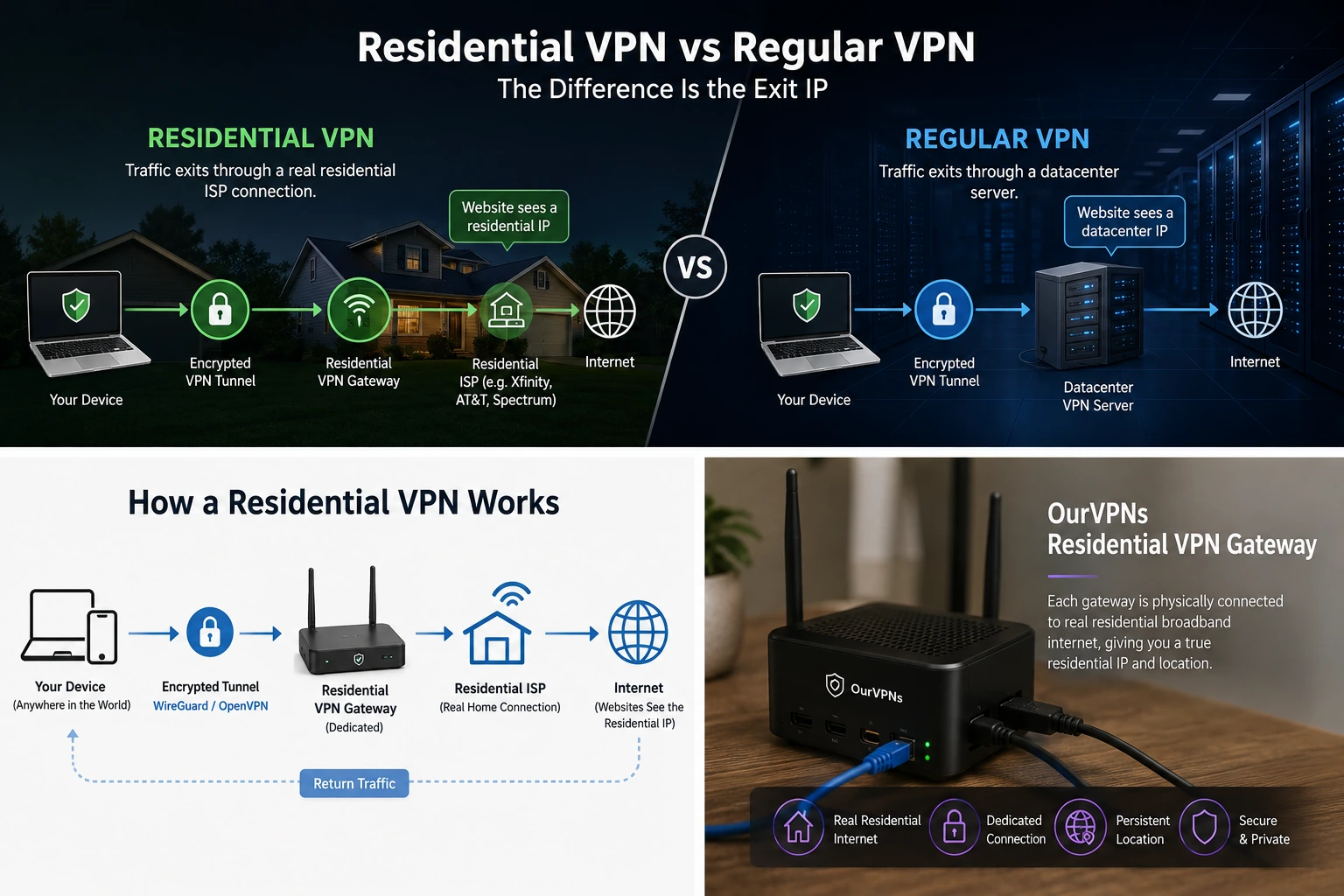
With a regular VPN, your traffic leaves the tunnel at a server in a datacenter. With a residential VPN, it leaves through an internet connection from a consumer ISP. The website you visit sees that residential IP instead of your real one.
A simple way to picture it:
Regular VPN: your device, then an encrypted tunnel, then a datacenter server, then the internet.
Residential VPN: your device, then an encrypted tunnel, then a residential connection, then the internet.
Both are real VPNs. Both encrypt the trip between you and the endpoint. Both replace the IP websites normally see. The only difference is which kind of network your new IP belongs to. And that turns out to matter quite a bit.
"Residential" describes the exit, not the whole VPN
This is where a lot of explanations get messy.
A residential VPN does not automatically mean somebody's laptop is sitting in a spare bedroom forwarding your traffic. It can work that way. That is just one model.
The word "residential" really describes the network identity of the connection your traffic uses when it reaches the public internet. Two companies can both advertise a "residential VPN" while running completely different setups behind the curtain. Same label. Very different product.
Why home IPs carry more weight than server IPs
To see why a home address is treated differently, it helps to know how addresses get handed out.
Internet addresses are distributed in a chain. A global body called IANA hands big blocks to regional registries, those registries pass them to internet providers, and the providers assign individual addresses to customers. The RFC 2050 guidelines describe that allocation chain, and it still underpins how an address reaches your router today.
The old style IPv4 addresses have almost run out. According to APNIC's review of 2024, the central pool held only about 768 addresses at the end of that year, and all the regional registries combined had roughly 4.6 million left, against about 3.687 billion already handed out worldwide.
Home addresses are scarce, tied to real paying customers, and shared or reassigned among ordinary households over time. That gives them a reputation server addresses do not have. Block a datacenter range and you mostly annoy bots. Block a home ISP range and you lock out real customers, which websites really do not want to do.
That matters more every year, because bots now outnumber people. Imperva's 2025 Bad Bot Report found that automated traffic made up 51% of all web traffic in 2024, with bad bots alone at 37%. To fight that flood, many sites screen visitors by the type of network they come from, and datacenter ranges get the most suspicion.
How does a residential VPN work?
When you connect, your device builds a secure tunnel to a VPN endpoint using a protocol such as WireGuard or OpenVPN. If you want to see what that looks like in practice, our WireGuard setup guide walks through it.
Instead of your device contacting a website directly, the traffic travels through the tunnel first. The endpoint then sends it out to the internet.
So imagine you are physically in Mexico, and your residential VPN endpoint sits on a home internet connection back in the United States. The website does not see your Mexican IP. It sees the American residential IP. The reply travels back the same way, through the residential connection and down the tunnel to you.
Your laptop is not teleporting anywhere. Your physical internet connection still exists. The VPN changes the path your traffic takes and the public exit point websites see.
Residential VPN vs regular VPN
The easiest way to understand the difference is side by side.
Residential VPN
Traffic exits through a residential ISP network.
The public IP looks like a home, not a hosting company.
Encryption works the same as a regular VPN.
The IP may be shared or dedicated, rotating or persistent, depending on the provider.
Locations are usually more limited.
It costs more, because residential connections cost more to provide.
Regular VPN
Traffic exits through commercial server infrastructure.
The public IP is usually listed as hosting or datacenter.
IPs are often shared by many users at once.
Hundreds or thousands of servers in lots of countries.
Cheaper plans, and often very fast.
Excellent for general privacy, public Wi-Fi and everyday use.
A residential VPN is not automatically "better." That is worth saying clearly. It solves a more specific problem: giving you a residential exit instead of the datacenter exit most VPNs use.
Residential VPN vs residential proxy
These two get confused constantly, because both can give your traffic a home IP.
A VPN encrypts a tunnel and can carry everything your device sends, or everything behind a router. A proxy is usually set up for one browser or one app, and many proxies do not encrypt anything at all. Residential proxies are built for automation: data collection, price monitoring, testing, and rotating through huge numbers of addresses.
Regular VPN: whole device, encrypted, datacenter address, easiest to spot.
Residential proxy: one app, often unencrypted, home address, built for automation.
Residential VPN: whole device, encrypted, home address, built for people.
If you need 10,000 rotating IPs for automated requests, you do not want a residential VPN. If you want your laptop or travel router connected through one home location, you do not want 10,000 proxies. We go deeper in residential VPN vs residential proxy.
Not all residential VPNs work the same way
This is probably the most important section in the whole article. There are three main ways a company can build something it calls a residential VPN.
Peer to peer networks
Regular people contribute bandwidth from their home connections, and other customers route traffic through them. This creates an enormous pool of IPs in lots of countries.
The tradeoff is control. The connection you are using belongs to someone else, the address may change, speed varies, and everything depends on how honestly the network recruits those homes. Security researchers have tied a worrying share of residential proxy capacity to devices whose owners never agreed to share anything. Ask how the IPs are sourced.
Residential or ISP IP pools
Some services give you access to pools of addresses registered to consumer ISPs. Depending on the service, those addresses may rotate often or stay "sticky" for a while. This scales much better than physical hardware, and it is common when customers need lots of addresses. It is still very different from having one residential connection assigned to you.
Dedicated residential gateways
The third approach is much more literal. A VPN gateway is physically plugged into home broadband where the customer needs it. Your tunnel reaches that gateway, and your traffic exits through the ISP serving that connection.
This does not scale to thousands of locations overnight. Someone actually has to set up and maintain the internet line and the hardware. But that is the point. Instead of picking an address out of a giant pool, you get one consistent residential endpoint tied to one real connection.
That is the model we use at OurVPNs.
Residential, static and dedicated are three different things
These words get mixed together all the time. They should not be.
Residential describes where the IP comes from: a home internet provider rather than a hosting company.
Static or persistent describes whether the IP changes over time.
Dedicated describes who uses it: one customer, rather than a crowd.
You can have any combination: a shared residential IP, a rotating residential IP, a persistent residential IP, a dedicated residential IP, or a dedicated datacenter IP.
That last one trips people up. Picture a VPN company with a server in a datacenter in New York. Normally hundreds of customers share one IP on it. The company can assign one IP on that same server just to you. Now you have a dedicated IP. But it is still a datacenter IP.
"Dedicated" answers: who else is using this address? "Residential" answers: what kind of network does it belong to? Different questions. Our guide to dedicated vs static vs residential IPs goes through every combination.
Why would someone use a residential VPN?
There is no single answer, but most people fall into one of these groups.
Remote workers and frequent travelers. People who want one consistent home style connection instead of popping up from a different server every time they reconnect. Pair it with a travel router and every device behind it is covered, no app needed on each one. More on that in residential VPN for remote work.
Digital nomads. Some people care less about 100 countries and more about one stable connection in the one place they actually need.
People who need a consistent IP. Some online services get nervous when your IP changes constantly. A persistent residential connection cuts down that switching.
IP allowlists and remote access. When a server, firewall or service only lets in approved addresses, consistency matters more than a long server list.
Streaming from abroad. Streaming platforms block datacenter ranges aggressively. A home IP looks like a normal viewer, which is why it tends to work far better for reaching the services you already pay for.
Ad checks and price research. Brands confirm their ads show correctly in a market, and shoppers or analysts see the prices a real local visitor gets.
Sites that quietly reject servers. Some banking portals, ticketing sites and logins refuse connections from hosting networks by default.
What about countries that block VPNs?
A residential IP fixes one problem: how your exit looks to the website. It does nothing about a government firewall in the country you are standing in. In places like China, the UAE, Turkey and Russia, the network can spot ordinary VPN protocols and cut them off before your traffic ever reaches the residential exit.
That is why OurVPNs includes Stealth mode on every plan. Stealth uses VLESS + REALITY + XTLS Vision and Hysteria2 so your connection looks like regular web traffic, and it works on our routers too. As of October 2026 we have tested it working from China, the UAE, Turkey and Russia. Censors change their rules often, so we keep testing. Local laws on VPN use vary, so check the rules where you are.
When a regular VPN is actually better
Residential VPNs are not the answer to every VPN problem. For a lot of people, buying one would just cost more without much benefit. A good regular VPN is usually the smarter pick if you want:
protection on public Wi-Fi
cheap everyday privacy
to change countries often
a huge choice of locations
maximum raw speed
to hop between lots of different IPs quickly
Datacenter infrastructure scales cheaply. Residential infrastructure does not. If a normal VPN already does exactly what you need, there is no reason to make life more complicated.
Are residential VPNs undetectable?
No VPN is an invisibility cloak, and anyone who promises one is selling you a costume.
Changing your IP changes one part of your network identity. Websites and apps can also look at IP reputation, your browser, DNS behavior, account history, device settings and network quirks. A residential IP handles one piece of that picture: the network your traffic comes from. That is meaningful. It is not everything. If you want to check the other pieces, run a VPN leak test after you connect.
How to check whether an IP is really residential
Do not just trust the homepage. Look at the IP yourself.
Public IP lookup tools show you the ISP or organization, the ASN (the network that announces the address), approximate location, and whether the address is flagged as hosting, proxy or VPN. The ASN is the most useful clue. If your "residential" VPN shows a cloud hosting company, ask questions. If it shows the consumer ISP you expected, that is a strong sign you are really exiting through that network.
One warning: IP databases disagree, and they lag behind changes. Check two or three sources and look at the overall picture rather than treating one website as gospel. Our explainer on residential vs datacenter vs ISP IPs explains what each label means.
How to choose a residential VPN
Price matters, but make it the last filter, not the first. A cheap service with unstable addresses costs you more in failed sessions than it saves. Ask:
Which ISP owns the address, and can I verify it myself?
Is the IP shared, or mine alone?
Does it rotate, or stay the same?
What is physically behind it: a stranger's home, an IP pool, or a dedicated gateway?
How are the IPs sourced? Consent based sourcing, or the provider's own lines, is more stable than pools built from infected devices.
Can I use it on a router or travel router?
Will it work in countries that block VPNs?
Am I billed per GB, per IP, or a flat plan, and does that match how I will use it?
Then test it against the exact site or task giving you trouble. If a regular VPN already gets you through, keep it. Our comparison of the best residential VPNs runs six providers through these questions.
How OurVPNs does it
We built OurVPNs around a simple idea: if somebody needs a residential connection, give them an actual residential connection instead of making the word more complicated.
Our locations use dedicated VPN gateways plugged into real residential broadband. You connect through an encrypted tunnel with WireGuard, OpenVPN or Stealth, and your traffic exits through the home internet connection at that gateway. We do not shuffle customers through a giant pool of unrelated addresses. The goal is consistency:
a real residential ISP connection
a persistent location
a dedicated gateway
support for routers, travel routers and everyday devices
Stealth mode for places where regular VPNs get blocked
That approach has an obvious tradeoff. We cannot conjure a new location inside a datacenter in five minutes. If we do not have residential infrastructure somewhere, we do not pretend we do. For the people who actually need this kind of connection, we think that trade is worth it.
Frequently asked questions
Is a residential VPN a real VPN? Yes. "Residential" describes the exit connection. The tunnel between you and the endpoint still uses normal VPN protocols and encryption.
Is a residential VPN legal? Using a VPN is legal in most countries, including the United States, for lawful things like privacy and reaching content you are entitled to. It does not make anything illegal legal. A few countries restrict VPN use, so check local rules before you travel.
Does a residential VPN always have a static IP? No. Depending on the provider it can be rotating, sticky or persistent. If keeping the same IP matters, ask directly.
Is every dedicated VPN IP residential? No. A dedicated IP can still live in a datacenter. Dedicated means it is not shared. It says nothing about the network behind it.
Are residential VPNs faster than regular VPNs? Not usually. Speed depends on the home broadband behind the gateway, the hardware, the protocol and the distance. Big datacenter servers have enormous bandwidth. For everyday browsing, streaming and video calls, a good residential line is plenty.
Do residential VPNs work with streaming services? They tend to work much better than datacenter VPNs, because streaming platforms block server ranges hard. No provider can promise every service will always work.
Can websites identify a residential VPN? Rarely by the IP alone, since it does not carry the obvious datacenter label. But the IP is not the only signal, so nobody can guarantee total invisibility.
Is a residential VPN safer than a regular VPN? Not automatically. Security depends on the protocol, encryption, setup and the provider's practices. Residential describes where the network comes from, not how secure it is.
Can I put a residential VPN on a router? If the provider gives you a compatible config, yes, and then every device behind the router uses it. See VPN router vs VPN app for which setup suits you.
Is a residential VPN the same as a VPN back to my own home? Related, but not the same. You can run your own VPN server at home and connect to it while traveling, and then your own house is the residential exit. That depends on your home upload speed and your router staying online, and some home connections sit behind CGNAT, which makes it harder (see home VPN behind CGNAT). A residential VPN provider handles the connection and hardware for you.
So, do you actually need one?
Probably not if you just want a normal VPN. And that is fine. Regular VPNs are cheap, fast and everywhere.
A residential VPN makes sense when you care about something more specific: where your internet connection actually comes out. If that is you, look past the product name and ask what ISP owns the address, whether it rotates, whether others share it, and what is physically behind it. If a provider cannot explain what makes its connection residential, that is your answer.
If you want one real residential connection that stays put, with Stealth included, start the 3 day free trial and check the IP and ISP yourself. Plans are $35 a month (three devices, one location) or $350 a year (five devices, two locations).