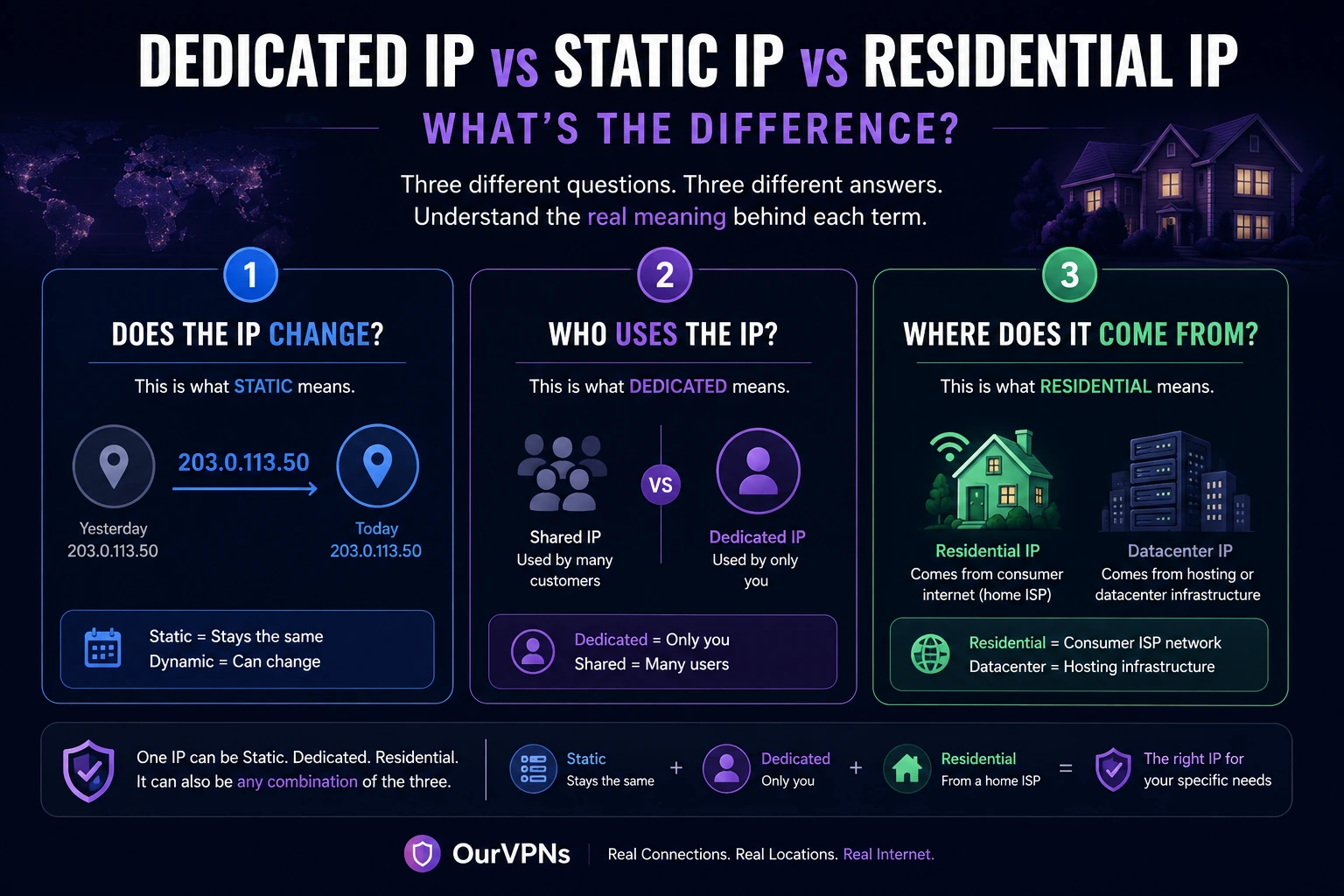
Dedicated IP vs Static IP vs Residential IP: What's the Difference?
People talk about static IPs, dedicated IPs and residential IPs as if they were competing types of IP addresses.
They aren't.
That's why comparing VPN plans can become confusing very quickly.
A provider might advertise a static IP. Another advertises a dedicated IP. Another promises a residential IP. Then someone offers a dedicated static residential IP and suddenly it sounds like four different products got mashed together.
There is a much easier way to understand it.
Each term answers a completely different question:
Static: Does the IP change?
Dedicated: Who else uses the IP?
Residential: What kind of network does the IP come from?
Once you separate those three questions, the terminology becomes surprisingly simple.
What Is a Static IP?
A static IP address is an address that stays the same instead of regularly changing.
That's it.
Static describes persistence.
It does not tell you whether the IP is residential.
It does not tell you whether the IP belongs only to you.
It does not tell you whether it comes from a datacenter.
For example, a VPN provider could operate one server with the IP:
203.0.113.50
Every time you connect to that particular server, you receive the same public IP.
That is a static IP.
But 20 other customers could also be connecting through 203.0.113.50.
The address is still static.
It just isn't dedicated.
This distinction is important because some VPN services genuinely sell shared static IPs. Windscribe, for example, offers static IPs that can be shared among a small number of users rather than assigned exclusively to one customer.
What Is a Dynamic IP?
A dynamic IP can change over time.
Most residential internet connections use some form of dynamic addressing.
Your ISP assigns an available public IP to your connection. You might keep it for days, weeks or even months, but there is usually no guarantee that it will remain yours permanently.
Dynamic IPs are also common with regular VPN services.
You connect today and receive one VPN address.
You disconnect.
Tomorrow you reconnect and receive another.
For most everyday internet use, that is completely fine.
The problem starts when consistency matters.
Remote systems may use an allowlist that expects one particular IP.
Websites may see repeated logins coming from different addresses.
A service might ask for additional verification after a sudden network change.
In those situations, keeping the same public IP can be useful.
That's what a static IP solves.
What Is a Dedicated IP?
A dedicated IP is an IP address reserved for one customer, account or organization rather than intentionally shared among many unrelated VPN users.
Dedicated describes exclusivity.
Most dedicated VPN IPs are also static because a dedicated address would not be very useful if it changed every time you connected.
That's why the terms often get used interchangeably.
But technically, they describe different properties.
A static address answers:
Does this IP stay the same?
A dedicated address answers:
Is this IP assigned only to me?
NordVPN describes its dedicated IP as a static address assigned exclusively to one customer. Surfshark uses essentially the same model for its dedicated IP product.
Static IP vs Dedicated IP
Here's the easiest example.
Imagine two apartments.
Both have permanent street addresses.
The first apartment has ten roommates.
The second apartment has one person living in it.
Both addresses are static because they don't change.
Only the second address is dedicated to one person.
VPN IPs can work the same way.
Shared Static IP
The address doesn't change, but several VPN users can use it.
Dedicated Static IP
The address doesn't change and it is reserved for one customer.
Both are static.
Only one is dedicated.
This matters because activity from other users on a shared static address can affect the reputation of that IP.
With a dedicated IP, you're not intentionally sharing that reputation with a large pool of strangers.
What Is a Residential IP?
Now we move to a completely different question.
A residential IP is associated with consumer internet service rather than conventional datacenter or hosting infrastructure.
Residential describes network origin.
It says nothing by itself about whether the address changes or whether other users share it.
A residential IP could be:
dynamic and private to one household
persistent and shared
static and residential
dedicated and residential
rotating as part of a residential IP pool
This is why the phrase residential IP should not automatically be interpreted as dedicated residential IP.
Those are different claims.
If you want a deeper explanation of the network side, we cover it in Residential IP vs Datacenter IP vs ISP IP.
The Three Questions That Make IP Terminology Easy
Forget the marketing labels for a second.
Whenever you're comparing VPN IPs, ask these three questions.
1. Does the IP change?
If no, it is static or persistent.
If yes, it is dynamic or rotating.
2. Who uses the IP?
If it is reserved exclusively for you, it is dedicated.
If multiple unrelated customers use it, it is shared.
3. What type of network does the IP come from?
If it exits through consumer broadband, it is residential.
If it belongs to hosting infrastructure, it is generally considered datacenter.
If it uses ISP associated address space on hosted infrastructure, you may see it marketed as an ISP IP.
Those three questions tell you almost everything you need to know.
Can an IP Be Static and Residential?
Absolutely.
A static residential IP is simply a residential address that stays consistent over time.
The word static describes the behavior.
The word residential describes the network.
These are compatible properties.
Think about a home internet connection where the public address remains unchanged.
You have:
Residential network + persistent IP
That is effectively a static residential connection.
Some VPN and proxy companies also sell products specifically marketed as static residential IPs.
What sits behind those products can vary, so it is still worth checking how the provider sources and operates the connection.
Can an IP Be Dedicated and Residential?
Yes.
This is the combination that matters most to the service we provide at OurVPNs.
A dedicated residential IP combines two characteristics:
Residential: the connection exits through residential broadband.
Dedicated: the connection or address is assigned to one customer rather than intentionally shared across a large pool of VPN users.
If the IP also remains persistent, you now have all three characteristics:
Static + Dedicated + Residential
That is not a separate fourth type of IP.
It is simply one IP with three properties.
What Is a Dedicated Residential VPN?
A residential VPN routes VPN traffic through residential internet rather than the typical datacenter infrastructure used by most commercial VPNs.
A dedicated residential VPN takes that a step further.
Instead of rotating customers through a large pool of residential addresses, the customer receives a specific residential connection or endpoint.
A typical connection looks like:
Your device → Encrypted VPN tunnel → Dedicated gateway → Residential ISP → Internet
That can provide something very different from a traditional shared VPN server.
The goal isn't access to 5,000 servers.
The goal is consistency.
Dedicated Residential IP vs Dedicated Datacenter IP
This is another distinction that gets lost in VPN advertising.
A provider can give you a dedicated IP without giving you a residential IP.
Imagine a VPN company has a server inside a datacenter.
They reserve one IP on that infrastructure exclusively for you.
You now have:
Static: yes
Dedicated: yes
Residential: no
Now imagine a VPN gateway connected to a real residential broadband connection, with that connection reserved for one customer.
You have:
Static or persistent: yes, depending on the ISP setup
Dedicated: yes
Residential: yes
Both products offer dedicated connectivity.
The network behind the address is different.
That difference is why we recommend checking more than the words “Dedicated IP” on a pricing page.
For a real world example, see how NordVPN's dedicated IP compares with a residential IP.
Why Do Most VPNs Use Shared IP Addresses?
Shared IPs aren't some cheap mistake.
They have real privacy benefits.
When hundreds or thousands of people use the same VPN address, activity from many users appears behind one public IP.
That makes it more difficult to associate activity at the IP level with one particular VPN customer.
ExpressVPN explicitly points out this privacy advantage when comparing shared and dedicated IP addresses.
There is a tradeoff, though.
If thousands of customers share an IP and some of them abuse websites, send spam or trigger automated defenses, the reputation of that shared address can suffer.
That can lead to things like:
more CAPTCHAs
additional verification
blocked IP addresses
inconsistent access
difficulty using IP allowlists
A dedicated IP trades some of the anonymity benefits of a large shared crowd for greater consistency and control.
That doesn't automatically make one better.
It depends on what you need.
When Does a Static IP Matter?
A static IP becomes useful when another system expects to see the same address repeatedly.
Common examples include:
Remote Access
A company server can allow connections only from a known IP.
If your address changes constantly, maintaining that allowlist becomes difficult.
Business Systems
Internal dashboards, databases and administrative tools can restrict access to approved addresses.
Consistent Login Behavior
A stable network identity can reduce unnecessary IP changes between sessions.
It does not guarantee that a website will stop asking for verification because IP address is only one of many signals a service can use.
Hosting and Self Hosted Services
If people or systems need to connect back to your network, having a predictable address makes configuration much easier.
When Does a Dedicated IP Matter?
Dedicated IP matters when you care about who else can affect the reputation of your address.
With a shared VPN IP, you're sharing that reputation.
With a dedicated IP, the traffic using that address comes from your connection or account.
That can be helpful for:
IP allowlisting
persistent remote access
business applications
reducing problems caused by other VPN users
maintaining one known external address
But there is another side to it.
If one address is always associated with your sessions, it provides less crowd anonymity than disappearing among thousands of users behind a shared IP.
That privacy tradeoff should be understood rather than hidden.
When Does a Residential IP Matter?
Residential becomes relevant when the type of network itself matters.
Most conventional VPNs route traffic through hosting or datacenter infrastructure.
That is perfectly fine for general VPN use.
But someone may specifically need traffic to exit through residential broadband.
This can matter for remote workers, travelers, people maintaining a consistent home country connection, or users who simply require a particular type of network environment.
A residential IP does not guarantee that a website will treat you like somebody sitting at home.
Modern services can evaluate far more than the IP address.
It does mean that the public connection itself comes from residential network infrastructure rather than a traditional VPN datacenter.
Dedicated Does Not Mean Residential
This deserves repeating because it is probably the biggest misconception in this entire topic.
A dedicated VPN IP is not automatically residential.
NordVPN, Surfshark and other large VPN services sell dedicated IP products.
Those products solve the problem of sharing an IP with other VPN users.
They should not automatically be assumed to provide a real home broadband connection.
These are two separate benefits.
If you specifically want residential connectivity, ask what network sits behind the dedicated address.
Static Does Not Mean Dedicated
This misconception is just as common.
A VPN can give multiple customers access to the exact same static address.
The address remains unchanged.
It is therefore static.
But because several people use it, it isn't dedicated.
Windscribe is a useful real world example because it intentionally offers shared static addresses rather than dedicated ones. The company says this approach preserves some of the privacy advantages of having multiple users behind the same IP.
So seeing the word static on a VPN plan does not mean you are the only person using that IP.
Ask.
Residential Does Not Mean Static
Normal home internet proves this one.
Millions of residential broadband customers use dynamic public IP addresses.
The connection is genuinely residential even though the ISP may eventually change the address.
Residential tells you where the connection comes from.
Static tells you whether the address changes.
Completely different properties.
Which Combination Should You Choose?
There isn't one ideal configuration for everybody.
For General VPN Privacy
A shared VPN IP is usually perfectly fine.
In fact, sharing an address with many other customers can improve crowd anonymity.
For IP Allowlisting
A static dedicated IP is usually the important combination.
Whether it is residential may not matter at all.
For Someone Who Needs Residential Network Identity
You want a residential IP.
Then decide separately whether it also needs to be persistent and dedicated.
For Long Term Residential Connectivity
The strongest combination is:
Residential + Dedicated + Persistent
You have a residential network exit, the connection is reserved for you, and the public identity remains consistent.
That's the combination OurVPNs is designed around.
How OurVPNs Approaches It
At OurVPNs, we use dedicated gateways connected to real residential broadband in our available locations.
Rather than treating “residential,” “dedicated” and “persistent” as interchangeable marketing terms, we care about all three separately.
Residential: traffic exits through actual residential broadband.
Dedicated: each residential connection is assigned to a specific customer rather than intentionally shared among a large public VPN pool.
Persistent: the goal is to maintain a consistent public network identity instead of constantly rotating the customer across unrelated addresses.
The gateway sits at the residential connection itself.
The path is straightforward:
Your device → Encrypted VPN tunnel → Dedicated residential gateway → Residential broadband → Internet
That physical architecture is the main difference between what we provide and simply buying a dedicated IP attached to a commercial VPN server.
What Should You Ask Before Buying a VPN IP?
You don't need to become a network engineer.
Ask the provider five simple questions:
Will my public IP stay the same?
Will anyone else use the same IP?
Is the address residential or datacenter?
Which ISP or network owns the exit IP?
Can I verify the address myself after connecting?
If the provider can answer those clearly, you know what you're buying.
If every answer circles back to vague phrases like “premium IP,” “clean IP” or “private server,” ask again.
The underlying network matters more than the label.
Frequently Asked Questions
Is a Dedicated IP the Same as a Static IP?
Not exactly.
A static IP stays the same.
A dedicated IP is reserved for one customer.
Most dedicated VPN IPs are static, which is why the terms are frequently used together, but a static IP can still be shared.
Is a Dedicated IP Always Residential?
No.
A dedicated address can come from a datacenter, residential ISP or another type of network.
Dedicated describes exclusivity, not network origin.
Is a Residential IP Always Static?
No.
Many normal residential internet connections use dynamic IP addresses that can change over time.
Can a Residential IP Also Be Dedicated?
Yes.
A residential connection assigned to one VPN customer can be both residential and dedicated.
If the public address also stays consistent, it can be residential, dedicated and static or persistent at the same time.
Is a Static IP Better for Remote Work?
It can be useful when remote systems use IP allowlists or when keeping a consistent public network address matters.
Whether you specifically need residential connectivity is a separate question.
Is a Dedicated IP More Private?
Not necessarily.
A dedicated IP gives you greater consistency and control, but a shared VPN IP can provide greater crowd anonymity because many customers use the same public address.
How Can I Check Whether My Dedicated IP Is Residential?
Look up the public IP after connecting and check its ISP, ASN and network classification across several IP intelligence services.
Our guide to residential IP vs datacenter IP vs ISP IP explains what to look for.
The Simple Version
If you remember nothing else from this article, remember these three lines:
Static tells you whether the IP changes.
Dedicated tells you who uses the IP.
Residential tells you what kind of network the IP comes from.
One IP can be all three.
It can also be only one or two of them.
Once you stop treating those words as competing products, VPN pricing pages become much easier to understand.
And before paying extra for any of them, make sure the provider is actually answering the question you care about.