Residential IP vs Datacenter IP vs ISP IP: Key Differences
An IP address tells a website more than where to send your traffic. It also drops hints about what kind of network you are connecting from.
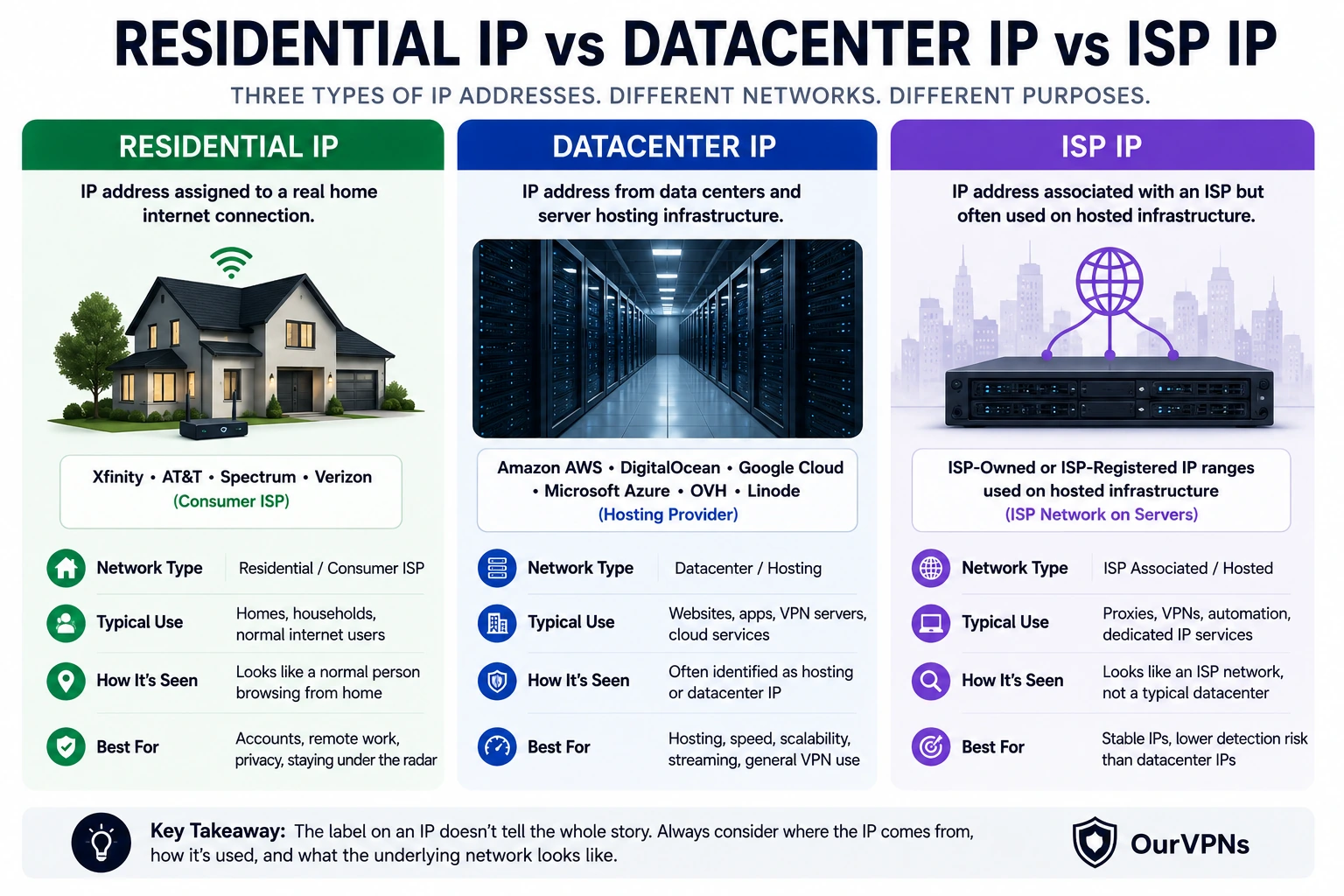
A home internet connection from Xfinity, AT&T, Spectrum or Verizon looks very different at the network level from a server rented from AWS or DigitalOcean. Then there is a third term that makes everything more confusing: ISP IP.
Residential, datacenter and ISP IPs are often presented as three tidy boxes. In reality the lines get messy, and that matters if you are choosing a VPN, a proxy, a dedicated IP or a remote work setup. So let's clear it up.
The short answer
Residential IP: comes from a consumer internet provider, the kind that serves houses and apartments. Looks like an ordinary household to most websites.
Datacenter IP: comes from a hosting or cloud company. Fast and cheap, but easy to recognize, and many sites treat it with more suspicion.
ISP IP: a marketing term. Usually an address registered to an ISP but running on hosted servers. Closer to residential on paper, but not necessarily a real home connection.
And none of those three labels tells you whether the address is static, rotating, dedicated or shared. Those are separate questions.
What is a residential IP address?
A residential IP is a public address tied to consumer internet service. Your modem connects to an internet provider, and that provider assigns a public IP to your connection, either directly or through an arrangement like carrier grade NAT.
A typical path looks like: your device, then your home router, then Xfinity or AT&T Fiber, then the internet.
The important part is not that a little house icon sits in some database. It is that the address belongs to a consumer ISP's network and is being used for home internet service.
Residential IPs can be dynamic or persistent, and some ISPs share them behind NAT. "Residential" does not automatically mean static, dedicated or private. There is also no magic tag inside an IP that says "I am residential." The label comes from the information around the address: the network announcing it, registration records, observed activity and IP intelligence databases.
This is the basic idea behind a residential VPN: your VPN connection exits through home internet service instead of a datacenter. For a plain comparison of the options from abroad, see seven ways to get a US IP address while traveling.
What is a datacenter IP address?
A datacenter IP comes from server or hosting infrastructure rather than household broadband. Cloud companies, VPS providers and hosting companies control enormous blocks of addresses.
Those addresses are completely legitimate, and they are ideal for servers. They are fast, stable, cheap and connected to networks with huge amounts of bandwidth.
The difference is context. If you are hosting a website or running an API, a datacenter IP is exactly what anyone would expect. If you are supposedly a person browsing from home, a hosting company IP looks like a different kind of environment, and plenty of websites notice.
What is an ISP IP?
This is where it gets interesting. "ISP IP" sounds like it should mean exactly the same thing as residential. Sometimes it does. Sometimes it does not.
Proxy and VPN companies often use "ISP IP" for addresses registered to, leased from or associated with consumer internet providers, but running on infrastructure that behaves more like a hosted server. You will also see names like static ISP IP, ISP proxy, static residential IP or ISP assigned IP, and companies do not use them consistently.
An ISP IP product tries to combine two things: the network identity of an ISP, and the speed and stability of hosted servers. That can be useful when you want a persistent address that does not obviously belong to a cloud provider.
But here is the key point: an IP being associated with an ISP does not prove your traffic is actually leaving through a real home broadband connection.
True residential endpoint: VPN gateway, then a residential modem or router, then a consumer ISP, then the internet.
ISP style hosted product: hosted server, then an ISP associated IP range, then the internet.
Both may look far closer to an ISP than an obvious cloud IP. The infrastructure behind them is still different. That is why it is worth asking a provider what actually sits behind the address.
Residential IP vs datacenter IP
The simplest difference is where the network comes from. Imagine two IPs. One belongs to Comcast Cable Communications. The other belongs to Amazon Technologies Inc. Without knowing where either computer sits, those names already tell you a lot. One is mostly home internet. The other is mostly cloud servers.
The same logic applies to VPNs. A regular VPN can give you a dedicated IP that stays exactly the same every day, but if that address belongs to a hosting network, it is still a datacenter IP. A residential VPN changes a different part of the equation: the kind of network your traffic uses to reach the internet.
So "is the IP dedicated?" does not tell the whole story. You also need to ask "what network does the IP actually belong to?"
Dedicated residential vs dedicated datacenter
"Dedicated" sounds like the important word. It is not. Plenty of dedicated IPs still get you stuck behind a CAPTCHA wall at 8 a.m. on a Monday. The word that decides how a website treats you is the one right before it.
Dedicated asks: is this address used only by me?
Residential or datacenter asks: where does this address live, on a home connection or on a server?
Websites do not just check who you are. They also weigh where you are connecting from, and a datacenter address is easy to flag because the internet keeps lists of those ranges. TorGuard, which sells both kinds of VPN, says it plainly: datacenter IPs face higher detection rates because websites keep databases of datacenter ranges, while residential IPs look like household traffic. Even NordVPN says its own dedicated IP will not suddenly look like a normal home connection and will not bypass VPN detection on its own.
For remote work, the difference shows up as extra CAPTCHAs, extra verification steps, or a flat "access denied" from a bank, a payroll system or a work tool that does not love server addresses.
Here is how the two compare:
Dedicated residential IP
Where it lives: a real home internet connection.
Shared: no, it is yours.
How sites usually treat it: like an ordinary visitor.
Speed: depends on the home connection behind it.
Best for: banking, allowlists, work logins, everyday remote work.
Cost: higher.
Dedicated datacenter IP
Where it lives: a server.
Shared: no, it is yours.
How sites usually treat it: with more scrutiny, since the ranges are known.
Speed: usually faster and more consistent.
Best for: business infrastructure, bulk tasks, places that do not check IP type.
Cost: lower.
Where a datacenter IP is actually the better tool
This is not a "residential always wins" article. A dedicated datacenter IP is the right pick when:
you need fast, consistent bandwidth for big file transfers or hosting
the destination only cares that the address is stable and allowlisted, not where it lives (some internal company tools work this way)
you are running automated or API work
budget matters more than the occasional CAPTCHA
Where a dedicated residential IP earns its keep
Banking and payments, which tend to treat a sudden datacenter address as a red flag.
Allowlists with risk scoring on top, where a residential IP looks like a person working.
Streaming and region locked services, which keep their own datacenter blocklists.
Any login you do not want to babysit. Fewer verification prompts, fewer interruptions.
One more thing vendors skip: "dedicated" only protects you from other users' bad behavior. It does not protect you from a website changing its rules, or from your own account getting checked for reasons that have nothing to do with the IP.
Can websites tell the difference?
Often, yes. But not perfectly.
Websites use IP intelligence services and their own data to look at the ISP or organization, the ASN, hosting classification, location, past activity, proxy or VPN flags and reputation history.
An ASN (Autonomous System Number) identifies the network that announces a block of addresses to the internet. One IP might belong to a big consumer broadband company's ASN, another to a cloud company's. That is useful, but it is not absolute proof of how a particular address is being used right now. IP ranges move, companies lease address space, ownership changes, databases fall behind and geolocation can simply be wrong. No single IP checker is the final word.
How to check what type of IP you have
You do not need to be a network engineer.
Find the public IP shown while you are connected.
Look it up on two or three IP intelligence sites.
Check the ISP or organization, the ASN and network owner, the hosting classification and the approximate location.
See whether the different sites tell roughly the same story.
If a supposedly residential connection keeps coming back as AWS, DigitalOcean, OVH, Vultr or another hosting company, ask questions. If it shows a consumer ISP like Comcast, Spectrum, AT&T or Verizon, that is a much stronger residential signal. Our step by step guide on how to check if an IP is residential, datacenter or ISP walks through it.
Does residential automatically mean better?
No. Residential sounds great in marketing, but it is not universally better infrastructure.
Datacenter networks offer enormous bandwidth, excellent uptime, global reach and low costs. If you are hosting websites, running cloud apps, or just using a regular VPN for privacy, datacenter connectivity may be exactly what you want.
Residential has its own tradeoffs. Home internet has limited capacity, home hardware can fail, ISPs can change public IPs, and new locations take time and money to set up. It is also much harder to scale. The better question is always: which kind of network matches what you are trying to do?
Why this matters when choosing a VPN
Lots of VPN companies advertise a "dedicated IP." That sounds a lot like "dedicated residential IP." They are not the same thing. So when you compare VPNs, ask three separate questions:
Where does the IP come from? Residential, ISP style or datacenter.
Does it stay the same? Persistent or rotating.
Is it shared? Dedicated or not.
Together, those three answers tell you far more than any marketing label. Our guide to dedicated vs static vs residential IPs covers every combination, and if you are weighing your own home IP against a dedicated residential IP, see residential VPN for remote work.
A quick grown up note about work
A residential IP changes what websites and systems see. It does not change where you actually are, and an employer can still learn your location through company tools, device management software, calendars or plain conversation. Check your employer's policy first, along with any tax, security or compliance rules for where you are working. An IP address is a connectivity detail, not a permission slip.
How OurVPNs is different
OurVPNs uses physical VPN gateways plugged into real residential broadband at each location. The residential part is not just a label stuck on an IP range. The path looks like this: your device, then an encrypted tunnel, then a dedicated residential gateway, then a residential broadband ISP, then the internet.
You get a dedicated, non rotating residential U.S. IP that is used only by you, with locations across the country and more on the way. You connect with WireGuard, OpenVPN or Stealth on Windows, macOS, iOS, Android, Linux or a router. Stealth uses VLESS + REALITY + XTLS Vision and Hysteria2 so your connection looks like ordinary web traffic, which keeps it working in countries that block regular VPNs. As of October 2026 we have tested it working from China, the UAE, Turkey and Russia, and it is included on every plan.
This setup is not built to produce millions of rotating IPs. That is not what we are trying to do. It also means our location list is real. We cannot click a button and conjure a residential endpoint in every city. Someone has to set up the connection and install the gateway. For our use case, that limitation is the point.
Plans are $35 a month (three devices, one location) or $350 a year (five devices, two locations), and there is a 3 day free trial so you can look up the IP yourself.
Residential, datacenter or ISP IP: which do you need?
Cheap bandwidth, lots of servers, easy country switching: a regular datacenter VPN is hard to beat.
Fast, predictable address for infrastructure that does not check IP type: a dedicated datacenter IP.
A stable ISP associated address, without needing a real home connection: an ISP IP product may be enough.
Traffic that genuinely exits through home broadband, for logins, banking and everyday remote work: a dedicated residential IP, and now the infrastructure behind it really matters.
Not sure: try a residential option during a free trial and watch how your specific logins behave.
Whichever you pick, ask the provider what sits behind the address, which network announces it, whether it rotates, whether it is shared, and whether the connection actually exists where they say it does.
Frequently asked questions
Is a residential IP the same as an ISP IP? Not always. Home internet comes from an ISP, but "ISP IP" as a product name can also mean ISP associated addresses on hosted servers. Check how the provider defines it.
Is a datacenter IP bad? No. Datacenter IPs run huge parts of the internet. They are fast, scalable and reliable. They are just a different type of network from home broadband.
Is a dedicated IP always residential? No. Dedicated only means it is not shared. It can be a home address or a server address.
Which is better for remote work, residential or datacenter? For everyday logins, banking and allowlists, residential usually causes fewer problems. For raw speed and infrastructure that does not check IP type, datacenter can be the better fit.
Will a dedicated IP stop CAPTCHAs completely? It reduces them, especially if it is residential, but sites look at other signals too, so it is not a guarantee.
Can a residential IP be dynamic? Absolutely. Many home internet providers change your public IP from time to time.
Is a dedicated residential IP the same as my home IP? No. It is a separate residential address assigned to you. If you need your exact home IP, that is a different setup.
Can I use both? Yes. Plenty of people use a dedicated residential IP for daily logins and a datacenter option for infrastructure or bulk tasks.
Can an IP lookup be wrong? Yes. Different databases can show different locations, owners or classifications for the same address.
How do I know if a VPN really uses a residential IP? Look up the exit IP on several sites and check the ISP, ASN and hosting classification. Then ask the provider where its endpoints come from and what infrastructure sits behind them.
The bottom line
Residential, datacenter and ISP IPs are not three names for the same thing. A datacenter IP comes from commercial servers. A residential IP comes from consumer broadband. An ISP IP can mean different things depending on who is selling it. And "dedicated" only tells you who else uses the address, not where it lives, which is the part most websites actually react to.
So do not just ask whether a provider gives you an IP. Ask what kind of network that IP actually represents. If you want one that genuinely lives on home broadband, start the OurVPNs free trial and check it yourself.