Can You Run a Home VPN Behind CGNAT? WireGuard, Tailscale and Relay Options
If you have ever tried to build a home VPN and discovered that port forwarding simply does not work, there is a good chance your internet connection is behind CGNAT.
Carrier-Grade NAT is increasingly common on mobile internet, 5G home internet, some fiber connections, apartment networks and other ISP setups where multiple customers share public IPv4 addresses.
That creates an obvious problem for a traditional home VPN:
Your laptop needs to connect into your home network, but your home router may not have a unique public IPv4 address that the rest of the internet can reach.
So can you still run a home VPN behind CGNAT?
Yes — but the solution depends on the technology you use.
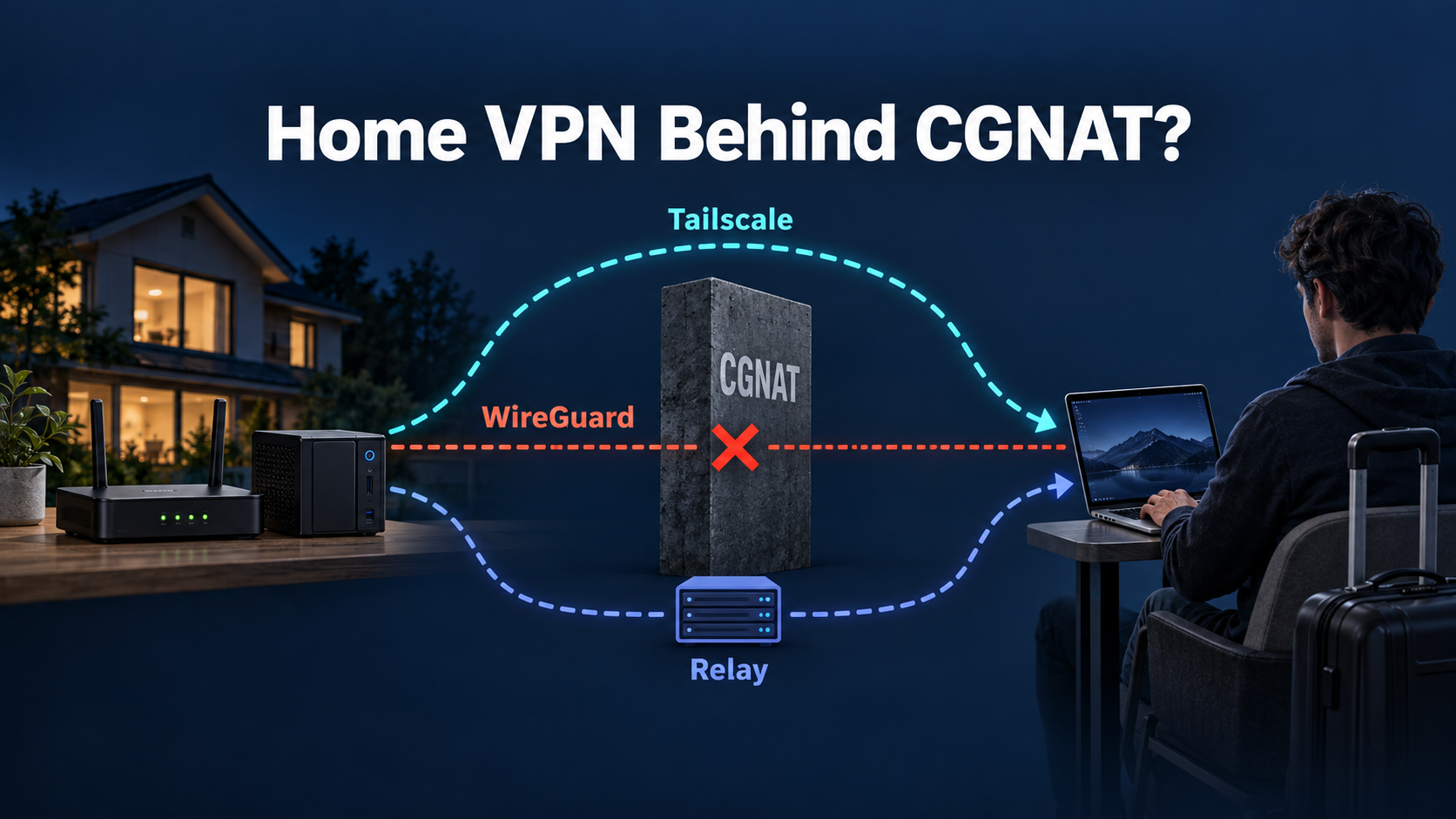
Traditional WireGuard may require extra infrastructure or ISP changes. Tailscale can often work without conventional port forwarding because it performs NAT traversal and can fall back to relays. Other architectures avoid hosting the VPN at home entirely.
Let’s break down what actually happens.
What Is CGNAT?
Normally, a home internet connection looks roughly like this:
Internet → your public IP → home router → your devices
Your router uses NAT to allow many private devices inside your house to share that one public address.
With Carrier-Grade NAT, your ISP adds another NAT layer.
The path becomes:
Internet → ISP public IP → ISP CGNAT → your router → your devices
Your router may receive an address from a private or shared range rather than a directly reachable public IPv4 address.
That matters because you control your home router, but you do not control the ISP's upstream NAT.
Opening a port on your router therefore may not open a usable path all the way from the public internet to your VPN server.
Why CGNAT Breaks Traditional Port Forwarding
Imagine you install WireGuard on a home router.
You tell the router:
Send incoming UDP traffic on port 51820 to my WireGuard server.
That rule can work perfectly inside the NAT you control.
But the public internet may never deliver the packet to your router in the first place.
The ISP's CGNAT gateway sits upstream and decides where inbound traffic goes. Since many subscribers may be sharing the same public IPv4 address, you generally cannot create a normal inbound port-forwarding rule on that ISP equipment.
That is the fundamental CGNAT problem.
If you want a broader refresher on WireGuard itself before digging into CGNAT, see our OurVPNs
How to Tell Whether You Are Behind CGNAT
A quick first check is to compare:
the WAN IPv4 address shown by your router
with:
the public IPv4 address shown by an external IP-checking site.
If they are different, NAT exists somewhere upstream.
An address in the shared IPv4 block 100.64.0.0/10 is also commonly associated with CGNAT.
Be careful, though: a mismatch does not automatically prove your ISP is using CGNAT in every case. Double NAT from your own modem/router setup can produce similar symptoms.
A useful troubleshooting sequence is:
Check your router's WAN IP.
Check your public IP externally.
Compare them.
Look for
100.64.x.xthrough100.127.x.x, or other private-style WAN addressing.Check your ISP documentation or ask support whether they use CGNAT.
Test whether a forwarded port can actually be reached externally.
Can WireGuard Work Behind CGNAT?
Yes, but there is an important distinction:
WireGuard clients behind NAT are usually easy.
A WireGuard server that needs unsolicited inbound connections can be much harder behind CGNAT.
WireGuard supports persistent keepalives for peers behind NAT or firewalls. They help maintain an already-established NAT mapping so that traffic can continue flowing.
But PersistentKeepalive does not magically create an inbound public port through your ISP's CGNAT.
That is a common misunderstanding.
If your home server is sitting behind CGNAT and the traveling client has no previously established reachable path to it, simply adding a keepalive does not turn the home connection into a publicly reachable WireGuard endpoint.
Option 1: Ask Your ISP for a Public IP
The simplest solution is sometimes not technical at all.
Ask your ISP whether they can provide:
a public IPv4 address
a static public IP
or an opt-out from CGNAT
Some providers offer this free.
Others charge a monthly fee.
Business plans sometimes include it.
If your ISP gives the home router a publicly reachable IPv4 address, traditional WireGuard becomes much simpler.
Then the path can look like:
Public IP → forwarded UDP port → WireGuard server
For users who prefer a conventional VPN setup, this is often the cleanest architecture.
Option 2: Use IPv6
CGNAT is primarily an IPv4 problem.
If both ends have usable IPv6 connectivity and the home network exposes the VPN server through IPv6, it may be possible to establish connectivity without needing IPv4 port forwarding.
But this approach introduces its own complications:
not every network provides IPv6
hotel and guest Wi-Fi support varies
firewall rules still matter
mobile and enterprise environments can behave differently
IPv6 can be elegant for technically comfortable users, but it is not always the most travel-friendly solution.
Option 3: Use Tailscale
This is where Tailscale becomes especially useful.
Tailscale creates an encrypted network between your devices and uses WireGuard underneath, but adds a substantial connectivity layer around it.
Rather than assuming one side must always have a manually forwarded public port, Tailscale attempts to establish direct peer-to-peer connectivity using NAT traversal.
For a home-IP setup, one device at home can operate as a Tailscale exit node.
Your travel device then sends internet traffic through that exit node.
The path looks like:
Travel laptop → Tailscale → home exit node → home ISP → internet
The public websites you visit therefore see the IP of the home connection.
What Happens When Tailscale Can't Connect Directly?
Tailscale tries to create a direct connection first.
But some NAT configurations are difficult enough that direct peer-to-peer connectivity cannot be established.
When a direct connection is unavailable, Tailscale can use relay infrastructure instead.
This is one reason Tailscale can work in scenarios where a simple home WireGuard server may not.
What Is a DERP Relay?
Tailscale's fallback relay system is called DERP, short for Designated Encrypted Relay for Packets.
When devices cannot establish a direct path, a DERP server can forward encrypted traffic between them.
So instead of:
Traveler → directly to home
the path may become:
Traveler → DERP relay → home exit node → internet
The relay helps the two endpoints communicate.
It does not automatically become the internet exit.
That distinction matters.
Can a Relay Still Give You Your Home IP?
Yes.
Suppose your route is:
Laptop → DERP relay → home Tailscale exit node → website
The DERP server is carrying the encrypted traffic between your laptop and the home device.
The final request to the website still exits through your home connection.
That means the website generally sees the public IP of the home ISP, not the relay server.
The relay and the internet exit are two different roles.
The Downside of Relays: Performance
A direct peer-to-peer path is usually preferable.
Relaying traffic adds another network hop and can increase latency or reduce throughput.
That distinction matters especially when routing all of your internet traffic through a home exit node.
Browsing websites may still feel perfectly fine.
But heavier tasks can expose the performance difference more clearly, including:
video calls
remote desktops
large uploads
cloud backups
high-bandwidth streaming
large software downloads
A successful connection does not automatically mean an ideal connection.
Tailscale Peer Relays
Tailscale also supports the idea of using another controlled machine as a relay between devices.
Instead of depending only on a public relay path, advanced users can introduce their own infrastructure.
Conceptually:
Travel device → your relay → home exit node
This gives more control over routing and may improve performance in situations where direct connectivity remains impossible.
The tradeoff is complexity.
You now have another server to configure, secure and maintain.
WireGuard vs Tailscale Behind CGNAT
The practical difference looks like this:
FeatureTraditional WireGuardTailscaleUses WireGuard encryptionYesYesPrefers direct connectionsYesYesAutomatic NAT traversalLimited/manualYesConventional port forwarding often needed for home serverYesOften noBuilt-in relay fallbackNoYesCan use home device as internet exitYesYesComplexity behind CGNATHigherUsually lowerControl over networkingVery highHigh
This does not mean Tailscale is simply “better than WireGuard.”
Tailscale uses WireGuard as part of its architecture.
The difference is that Tailscale adds coordination, device discovery, NAT traversal and relay options around the encrypted WireGuard connection.
Option 4: Use a VPS as a Meeting or Relay Point
Another approach is to rent a small cloud server with a public IP address.
Both the home device and travel device create outbound connections to that server.
Since outbound connections usually work behind CGNAT, the VPS can become the publicly reachable meeting point.
Conceptually:
Home → VPS ← Traveler
The VPS can then relay or route traffic between the two.
A more complete route may look like:
Traveler → VPS → home → internet
If the final internet traffic still exits through the home connection, the public website sees the home ISP address rather than the VPS address.
The VPS is acting as connectivity infrastructure rather than the final exit point.
This approach offers substantial control, but it is much more technical than a managed overlay such as Tailscale.
Option 5: Use a Managed Home-IP Product
Several companies now package these ideas into preconfigured home-and-travel systems.
Instead of building WireGuard, NAT traversal and routers yourself, a provider may supply:
home hardware
travel hardware
preconfigured networking
relay support
remote setup assistance
The advantage is convenience.
The drawback is that many of these systems still depend on your home internet connection remaining available.
That means your house remains part of the infrastructure.
A power outage, ISP outage or failed home router can still take the connection offline.
Option 6: Don't Host the VPN at Home
There is another way around CGNAT:
Do not use your home connection as the VPN server at all.
A managed residential VPN provides an exit through a residential broadband connection operated elsewhere.
The architecture becomes:
Traveler → residential VPN gateway → internet
instead of:
Traveler → your house → internet
This removes the need to expose a VPN server through your personal ISP connection.
It also removes several home-side failure points:
CGNAT
home power outage
home router failure
home ISP outage
inaccessible inbound ports
accidental home-router reset
The tradeoff is important:
You are no longer using your exact home IP.
You are using a different residential connection.
If you want a clear explanation of what “residential VPN” actually means, see What Is a Residential VPN? Residential VPN vs Regular VPN Explained. OurVPNs
What About GL.iNet Routers?
GL.iNet routers are popular for home-and-travel VPN setups.
A common design is:
GL.iNet router at home → WireGuard server
and:
GL.iNet travel router → WireGuard client
That can work very well when the home side has a publicly reachable address.
But if the home ISP uses CGNAT, ordinary WireGuard port forwarding may no longer be sufficient because the additional upstream NAT is outside your control.
At that point, the practical options become:
ask the ISP for a public IP
use Tailscale
use IPv6
add relay infrastructure
use a managed connectivity service
use a residential VPN instead of routing through your own home
If you are deciding whether to run the VPN directly on a device or at router level, our live VPN Router vs VPN App: Which Setup Is Better? guide covers that distinction. OurVPNs
How to Choose the Right CGNAT Solution
The easiest way to decide is to start with one question:
Do you need your exact home IP?
If yes, first ask your ISP for a public IPv4 address.
If they can provide one:
Traditional WireGuard is often the simplest route.
If they cannot:
Tailscale with a home exit node is usually one of the first options worth testing.
If Tailscale cannot establish a direct connection:
Expect relay usage and test performance carefully.
If relay performance is not good enough:
consider IPv6, a VPS or peer relay, a different ISP, or another connectivity architecture.
Do you only need a residential IP?
Then you may not need a home VPN at all.
A residential VPN can avoid the CGNAT issue entirely because the VPN endpoint is not sitting behind your personal home ISP connection.
That can make more sense when your priority is:
residential network origin
a specific available location
less hardware at home
fewer home-side failure points
simpler travel setup
For a deeper explanation of residential network identity, see our What Is a Residential VPN? guide. OurVPNs
Does CGNAT Make a Home VPN Impossible?
No.
It makes some traditional architectures harder.
That is an important distinction.
CGNAT does not mean:
“You cannot use your home connection remotely.”
It means:
“You may not be able to accept ordinary unsolicited IPv4 connections directly from the public internet.”
Technologies such as Tailscale work around this by attempting NAT traversal and introducing relays when necessary.
Other approaches use public relay servers, VPS infrastructure, IPv6 or a residential VPN endpoint elsewhere.
Final Thoughts
You can absolutely run a home VPN when your ISP uses CGNAT.
The easiest method depends on what you actually need.
If your ISP offers a public IPv4 address, traditional WireGuard remains simple, fast and effective.
If you cannot get a public address, Tailscale can be much easier because it adds NAT traversal and relay options around WireGuard.
If you prefer maximum control, a VPS or self-managed relay can bridge the two endpoints.
And if you do not actually require your exact home IP, a managed residential VPN removes the home CGNAT problem from the architecture entirely.
The key question is not:
“Does CGNAT kill home VPNs?”
It is:
“Do I need my exact home connection, or do I need reliable residential connectivity while I travel?”
Once you answer that, choosing between WireGuard, Tailscale, relay infrastructure and a managed residential service becomes much easier.