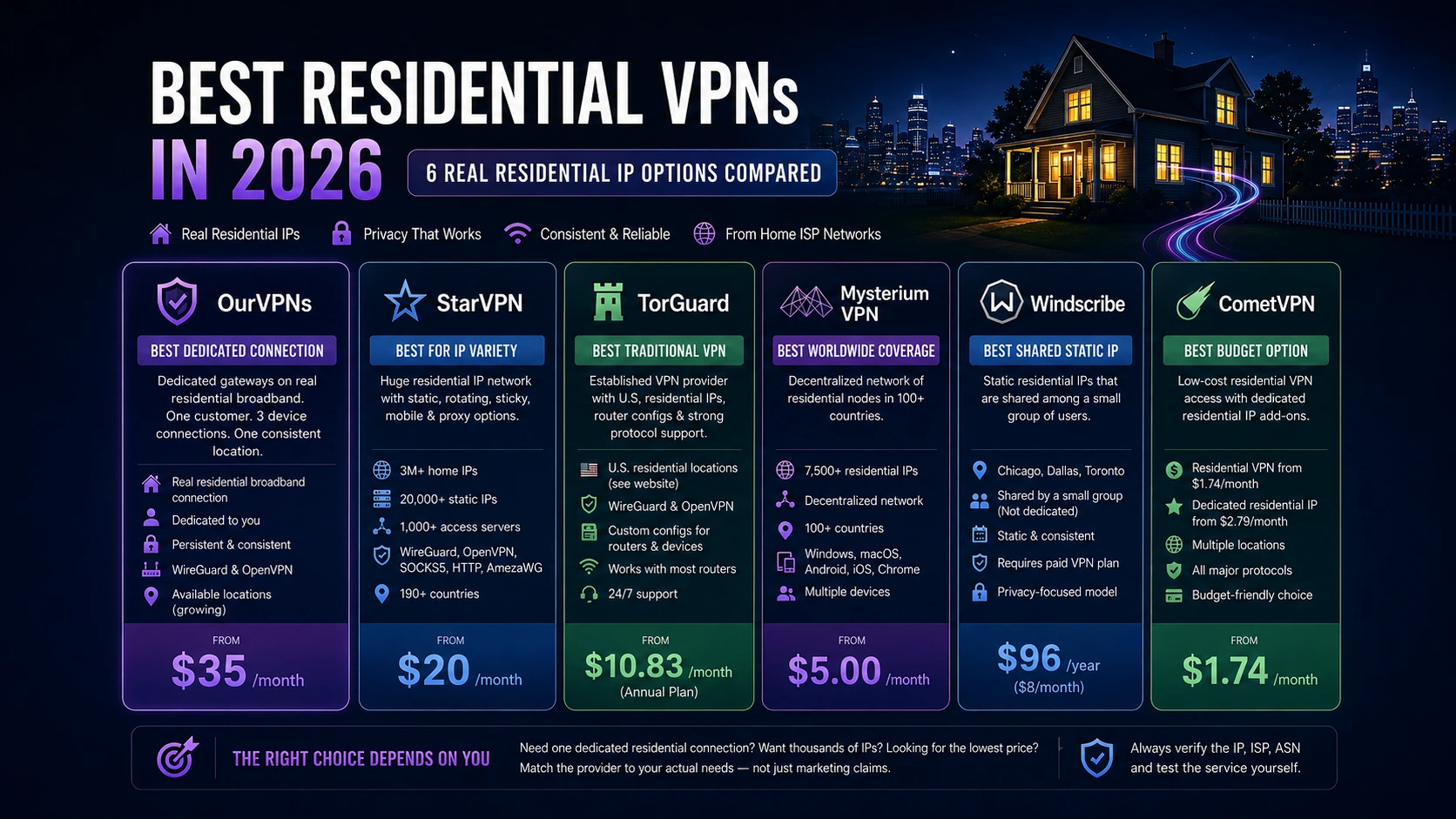
Best Residential VPN 2026: 6 Residential IP VPNs Compared
Most "best residential VPN" lists have a problem. Some of the VPNs on them are not actually residential.
A provider slaps a dedicated IP on an ordinary VPN server, somebody calls it residential, and suddenly a datacenter IP is sitting proudly on a list of supposedly residential VPNs. Very confident. Very wrong.
For this comparison we use a stricter definition. A residential VPN has to route your traffic through an IP tied to real residential or consumer ISP infrastructure. New to the idea? Start with our guide on what a residential VPN is and how it actually works.
There is a second question that matters just as much as "is it residential":
How does the provider actually get that residential IP?
One service gives you a dedicated connection that stays in one place. Another gives you an ISP registered address sitting in a data facility. Another routes you through somebody else's home connection. Another lets you hop between thousands of residential nodes worldwide. And a whole other category skips providers entirely and sends you back through your own house.
All of those can be legitimate. They are not the same product, and treating them like they are is how people end up disappointed.
One disclosure before we start: this comparison is published by OurVPNs. We obviously have a horse in this race. We will tell you plainly where we think we are the stronger pick, and where someone else genuinely makes more sense.
The quick answer
If you only read one section, make it this one.
OurVPNs. Best for one dedicated residential connection that stays put, with no hardware at your house. Dedicated VPN gateways sit on real residential broadband, and Stealth mode keeps it working where regular VPNs get blocked.
StarVPN. Best for a big residential IP ecosystem: static, rotating, sticky sessions, mobile IPs and proxies. Business Residential starts at $20 a month and Premium Residential at $45.
TorGuard. Best for a classic VPN company with a residential option. $19.99 a month, or $10.83 a month billed annually, with WireGuard and OpenVPN configs for routers.
Mysterium. Best for worldwide coverage. A decentralized network with residential access on its Plus tier, $13.49 a month or $2.99 a month on a two year plan, covering 7,500+ residential IPs in 108 countries.
Windscribe. Best for a shared static residential IP. $96 a year on top of a paid Windscribe plan, in Chicago, Dallas and Toronto.
CometVPN. Best for the lowest entry price, but it is really two products: usage based residential from $0.70 per GB, and a dedicated residential IP add on from $2.79 a month.
Home IP kits (KeepYourHomeIP, PacketMole, NomadEOS, Nomad Home IP). Best when you need your exact home IP and your house can stay online while you travel.
Quick comparison
Prices and plans move constantly in this market. These are what each provider's own site showed in September 2026, so verify before you buy.
OurVPNs: $35/mo or $350/yr. Dedicated gateway on real residential broadband. Dedicated IP. WireGuard, OpenVPN and Stealth (VLESS + REALITY and Hysteria2). Locations across the U.S., with more on the way.
StarVPN: Business Residential $20/mo, Premium Residential $45/mo. Rotating home connections plus ISP hosted static blocks. WireGuard and OpenVPN. 3M+ home IPs, 20,000+ static.
TorGuard: $19.99/mo ($10.83/mo annual). Dedicated residential. WireGuard and OpenVPN. Check location availability before buying.
Mysterium: $13.49/mo, or $2.99/mo on the 2 year plan. Shared pool of contributed residential nodes. 7,500+ residential IPs in 108 countries.
Windscribe: $96/yr plus a paid plan. Static residential IP, shared by a small number of customers. Chicago, Dallas and Toronto.
CometVPN: From $0.70/GB (usage based) or $2.79/mo (dedicated IP add on). Verify residential specific protocol support and locations.
Home IP kits: roughly $180 to $500 upfront, some with a monthly fee. Your own home ISP connection, through hardware you own. Location is wherever your house is.
How we compared them
We looked at where each provider's residential IPs actually come from, whether the address is dedicated or shared, how long an IP stays with one customer, locations, WireGuard and OpenVPN support, router compatibility, price, and whether you can verify the ISP and ASN yourself. Pricing was checked against each provider's own site in September 2026.
To be straight about the limits: beyond OurVPNs, we have not run every provider through a full IP, ASN, DNS and speed test like the one in our VPN leak testing guide. Where a claim comes from a provider's own marketing, we treat it that way instead of dressing it up as a test result.
First, decide what you actually need
Three people can type "best residential VPN" and mean three completely different things. One is traveling and wants one U.S. residential connection that stays put for months. Another needs thousands of addresses for testing. A third just wants a VPN whose IP does not scream "cloud server."
Same search bar. Completely different job. Before you spend money, figure out which of these matter to you:
One persistent residential IP, or a big rotating pool
Dedicated to you, or shared
Your exact home IP, or any steady residential IP
Worldwide locations, or one location done well
WireGuard, OpenVPN and router support
Working in countries that block VPNs
Low cost
No single provider wins all of these. That is exactly why we are not slapping a fake 9.7/10 score on everyone and calling it a day.
OurVPNs: best for one dedicated residential connection
We will start with ourselves, since we are the ones with the disclosure to make.
OurVPNs is intentionally not built like a giant VPN network. Instead of filling datacenters with servers, we set up residential connections in specific locations and put dedicated VPN gateway hardware on them. The path looks like this:
You → encrypted tunnel → dedicated gateway → residential ISP → internet
There is real hardware on a real residential broadband line. That makes it closer to having your own remote home connection than picking an address off a server list.
Where it makes sense: one persistent residential location, a dedicated IP, WireGuard or OpenVPN, router support, and a network identity that does not change every time you reconnect. Nothing runs at your house, so a power cut or a frozen router back home cannot take you offline.
Stealth mode, included on every plan. Regular VPN protocols are easy for censors and strict firewalls to spot. Stealth uses VLESS + REALITY + XTLS Vision and Hysteria2 so your connection looks like ordinary web traffic. It works on our routers too, and as of October 2026 we have tested it working from China, the UAE, Turkey and Russia. Censors change their rules often, so we keep testing.
Where it does not make sense: if you need sixty countries tonight or twenty thousand rotating IPs, we are the wrong tool. Our network grows slower than a datacenter fleet because each residential connection has to actually exist first. That is a real limitation. It is also the entire reason the product works the way it does.
Who we'd recommend it to: travelers, remote workers, people in countries that restrict VPNs, and anyone who wants one residential connection that stays part of their setup.
StarVPN: best for residential IP variety
StarVPN takes almost the opposite approach. It offers a huge catalog of IP products, currently advertising more than 3 million home cable and DSL IPs, 20,000 static residential IPs, rotating addresses, mobile IPs and over 1,000 access servers. That is a scale we do not attempt, and if scale is what you need, it is a real advantage. If you are weighing proxy shops too, our breakdown of IPBurger alternatives and what each product really is covers that side of the market.
Static and rotating are not the same thing here. StarVPN says its rotating addresses come from home ISP connections, while its static residential IPs are ISP provided blocks hosted in Tier 1 facilities. That distinction is exactly why it pays to understand residential, datacenter and ISP IPs before buying anything with "residential" in the name. Neither model is bad. You should just know which one you are paying for.
A reliability note. In August 2026, StarVPN publicly reported a cyber related incident affecting parts of its network, with users reporting unavailable locations and higher latency during recovery. We have not investigated beyond the company's public updates and user reports, so we will not speculate. What it does show is worth remembering with any provider: if your connection is business critical, have a backup.
Who we'd recommend it to: someone who needs far more IP choice and rotation than a single dedicated gateway can give. For its plans, data limits and refund policy in detail, see our StarVPN review.
TorGuard: a straightforward residential option
TorGuard takes the familiar route: a recognizable VPN company, a residential IP product, real apps and downloadable config files. The residential plan is $19.99 a month, or $10.83 a month billed annually, with WireGuard and OpenVPN. It also generates configs for compatible routers, which matters more than it sounds.
What we like: you are not locked into one app. If you run a travel router or a Linux box, getting the actual config file is genuinely useful.
What we'd verify: the exact location before you buy, since residential infrastructure is always more limited than a normal server fleet. Then check the assigned IP yourself. That applies to every provider here, us included. Our TorGuard residential IP review covers where those IPs are hosted and what to ask TorGuard before you pay.
Mysterium: best for worldwide coverage
Mysterium changes the architecture entirely. It runs on independent node operators, and your traffic can exit through residential connections contributed by that network. Residential access sits on its Plus tier, $13.49 a month or $2.99 a month on a two year plan, with more than 7,500 residential IPs across 108 countries.
If you need Spain today, Japan next week and Argentina after that, a distributed network makes a lot more sense than waiting for anyone to install four separate gateways. The tradeoff is the same thing that makes it powerful: you draw from a shared pool, not one endpoint assigned to you long term.
Who we'd recommend it to: someone who values worldwide availability over one dedicated endpoint, and does not mind a two year commitment for the lowest price.
Windscribe: a different privacy tradeoff
Windscribe is refreshingly upfront about what it does not offer. Its static residential IPs are shared among a small number of customers on purpose. Its reasoning: one customer tied to one address is easier to link to one account, while sharing keeps some of the privacy of a shared VPN IP.
So you get residential + static + shared instead of residential + static + dedicated. If those words still blur together, our guide to dedicated, static and residential IPs untangles them. Current locations are Chicago, Dallas and Toronto at $96 a year, on top of a paid Windscribe plan.
Who we'd recommend it to: someone who wants a consistent residential IP without it being tied only to them.
CometVPN: the budget wildcard
CometVPN earns attention for one reason: the price. It runs two separate residential products. Native Residential VPN is usage based from $0.70 per GB, and a Dedicated Residential IP add on starts at $2.79 a month.
Usage based billing can get expensive fast if you move a lot of data, so know which one you are buying. Then do what we would do right after paying: connect, find your public IP, check the ISP and ASN, see whether it changes, and run it through a few IP intelligence services. A very low price is just extra reason to confirm what you got.
Prefer your own home IP? The home IP kits
Here is a whole different category that often lands on these lists. Instead of renting someone else's residential connection, you plug one small router in at home and carry another one with you. Your traffic goes back through your own house, so websites see your actual home IP.
That is the right answer when something needs your exact home address, like a bank that knows it or a work allowlist. Prices below are what each company's site showed on September 18, 2026:
PacketMole: two GL.iNet routers built on Tailscale, $349 one time, no subscription. Designed for CGNAT homes like Starlink and T-Mobile Home Internet. When a direct path fails it uses relays, which are slower than direct connections. Support is email only.
NomadEOS: EUR 179.99 one time on the main site, no subscription, with weekday WhatsApp support. The product page lists 2.4 GHz Wi-Fi only and 10/100 Ethernet, so check it if your household streams a lot. More in our NomadEOS alternatives guide.
KeepYourHomeIP: two routers on WireGuard, EUR 298 (Economy Light) or EUR 428 (Business), plus EUR 8 a month. Human support seven days a week. Its FAQ says no public IP address is needed and the kit works behind NAT, so Starlink and 5G home internet are covered. It recommends at least 30 Mbps of home upload speed.
Nomad Home IP: the Nomad Scout kit is $499.99 plus a required $14.99 a month subscription. The priciest pick, aimed at people who want less setup.
DIY: make a home device a Tailscale exit node, or build a two router WireGuard setup. Cheapest, most educational, and you become the help desk.
You will also see KeepMyHomeIP ($299.99) and FlashedRouter ($349.99 plus a subscription). Both are covered in our KeepMyHomeIP alternatives post.
Before you buy any kit, check these four things:
Your home upload speed. Everything you download abroad has to be uploaded by your house first. Zoom suggests about 3.8 Mbps up for a 1080p call, so a slow home upload ruins meetings.
CGNAT. Starlink, 5G home internet and many apartment lines do not give you a public address. Some kits handle that and some do not. KeepYourHomeIP and PacketMole both say they work without a public IP, so check any other kit before you buy. Our CGNAT guide explains why.
Home dependency. If the house loses power or internet, your tunnel dies with it. Fine with a smart plug and a helpful neighbor. Not fine if you are gone for three months.
Your work laptop. Many employers block VPN apps. A travel router runs the VPN for the whole network, so the laptop just joins the Wi-Fi. Our post on VPN routers vs VPN apps covers the trade.
The key difference in one line: a kit helps you use your existing home connection from somewhere else. OurVPNs gives you a residential connection in a place where you may not have a home at all, without anything running in your house.
What about NordVPN, Surfshark and ExpressVPN?
They are good VPNs. That does not make them residential VPNs. Big mainstream services are excellent at huge server networks, polished apps, low prices, fast country switching and general privacy. Some also sell dedicated IPs.
The mistake is assuming dedicated IP = residential IP. It does not. A dedicated IP can sit on completely ordinary datacenter infrastructure. If you want general privacy, a mainstream VPN may be the better buy. If you need residential connectivity, verify that is what you are getting before you hand over a card number. If NordVPN's add on is the one tempting you, here's whether NordVPN's dedicated IP is worth it.
Need it to work where VPNs are blocked?
This is the question almost nobody asks until they land in Beijing or Dubai and their VPN quietly stops connecting.
Countries like China, Russia, the UAE and Turkey use deep packet inspection to spot and block common VPN protocols. A plain WireGuard or OpenVPN connection, residential or not, can be blocked or throttled there. Strict hotel and office firewalls do the same thing on a smaller scale.
If you are going somewhere like that, ask any provider two questions: does it offer an obfuscated or "stealth" protocol, and does that protocol work on the residential option, not just the regular servers? Ours does both: Stealth is included on every plan, on devices and on routers.
Which one would we actually choose?
Forget the idea of one universal winner. Here is how we would decide.
One residential U.S. connection that stays put, nothing at home: OurVPNs.
Traveling to a country that blocks VPNs: OurVPNs with Stealth mode.
Lots of residential IPs, or rotation: StarVPN.
Residential locations around the world: Mysterium.
A traditional VPN company with a residential plan: TorGuard.
A steady residential IP you do not mind sharing: Windscribe.
The cheapest entry point: CometVPN, then verify it yourself.
Your exact home IP for a bank or allowlist: a home IP kit or DIY. KeepYourHomeIP if you want a human on the phone any day, PacketMole if you would rather skip a monthly fee, and NomadEOS on a tight budget with ordinary fiber or cable at home.
The question most comparisons skip
Before anything else, ask: where is the connection actually coming from?
Not what the pricing page calls it, and not what one IP lookup site says. Is it a home internet connection? An ISP registered address in a facility? A decentralized peer? A datacenter server? A residential gateway? A rotating pool? Your own house? Those are genuinely different architectures, and anyone paying for a residential VPN deserves to know which one they are getting. If a free option is tempting, here's what free residential VPNs ask for in return.
Do not buy a VPN because it says "undetectable"
That word is everywhere in VPN marketing. We would not choose a provider based on it.
A residential IP removes one obvious signal: a public IP belonging to a recognizable datacenter. That is useful. It does not make the rest of your computer disappear. Sites can still look at DNS behavior, IP history, device configuration, browser fingerprinting, account history, time zone, location permissions and app telemetry.
A residential VPN changes your network exit. That can matter a lot. It is not an invisibility cloak, and any provider promising universal invisibility deserves more questions, not fewer.
Have a backup
The StarVPN incident is a reminder that is not really about StarVPN. OurVPNs can have an outage. So can TorGuard. So can your home ISP. Modems die, fiber gets cut, routers crash. If losing your connection would stop you from working, keep two genuinely independent options. Including when one of them is us.
A quick grown up note about work
A residential or home IP changes what websites see. It does not change where you are, and your employer may know anyway through a company VPN, device management software, calendars or plain old asking. Check your employer's policy before you go, along with the tax and legal rules for the country you will work from. An IP address is a connectivity tool, not a permission slip.
Before you pay, ask these questions
Is the exit IP genuinely residential, and which ISP and ASN does it use?
Is it dedicated to me or shared, and does it stay the same?
Is it real residential broadband, ISP hosted infrastructure, a peer connection, or my own house?
Can I download WireGuard or OpenVPN configs and use them on a router?
Does it work in countries that block VPNs?
What happens if the endpoint goes down?
Where do the IPs come from? Consent based sourcing, or the provider's own lines, is more stable than pools built from apps people did not know were sharing their connection. Our Tuxler VPN review shows what a community powered free tier looks like in practice.
Can I reach a human when something breaks at 2 a.m. on a trip?
Am I billed per GB, per IP, or a flat plan, and does that match how I will use it?
A company that really sells residential connectivity should answer those without turning the conversation into word salad.
Quick answers
Is a dedicated IP the same as a residential IP? No. Dedicated means it is assigned to you alone. It can still live on ordinary datacenter infrastructure. Residential describes where the address comes from.
Are rotating residential IPs good for a consistent connection? Not usually. Rotation is built for jobs where a changing address is the point, like testing. For one identity that stays the same for months, pick a dedicated or static residential connection.
What is the best home IP VPN for remote workers? It depends on your home internet and how long you will be away. KeepYourHomeIP suits people who want seven day support, PacketMole suits people who want no monthly fee (both say they work behind CGNAT), NomadEOS suits tight budgets, and a managed residential VPN suits people who do not want to rely on their house at all.
Do I need fast internet at home for a home IP kit? Yes, upload speed most of all. Your speed abroad will not beat your home upload.
Does Windscribe offer residential IPs? Yes, shared, as an add on: $96 a year on top of a paid plan, in a few U.S. and Canadian locations, with each IP going to a handful of customers.
Does a residential VPN work with a travel router? It depends on the provider. Look for downloadable WireGuard or OpenVPN configs, since that is what most travel routers need. OurVPNs also supports Stealth on routers.
Will a residential VPN work in China or the UAE? Only if it offers an obfuscated protocol. Regular VPN protocols get blocked there. OurVPNs Stealth has been tested working in China, the UAE, Turkey and Russia as of October 2026.
Can a residential VPN make me completely undetectable? No. It removes the obvious datacenter IP signal. DNS, fingerprinting, account history and other signals are separate issues.
Our residential VPN picks for 2026
Dedicated physical residential connection: OurVPNs
Works where VPNs are blocked: OurVPNs with Stealth
Residential IP variety and rotation: StarVPN
Traditional VPN with a residential plan: TorGuard
Worldwide decentralized network: Mysterium
Shared static residential IP: Windscribe
Lowest entry point: CometVPN
Your exact home IP: a home IP kit, or DIY
Yes, we put ourselves first in a couple of categories. We built OurVPNs around something the bigger networks do not prioritize: one customer, one real residential connection, one persistent location, and it keeps working when the local internet gets strict.
If you need ten thousand rotating addresses, buy something else. If you need a hundred countries, buy something else. If your own home connection already solves your problem, use it and save your money.
The best residential VPN is not the one with the biggest "#1" badge on its homepage. It is the one whose actual infrastructure matches what you are trying to do. If that turns out to be us, start the 3 day free trial and check the IP, ISP and consistency yourself. Plans are $35 a month (three devices, one location) or $350 a year (five devices, two locations).
Last updated
First checked in August 2026, revised in September 2026 with a fresh pricing review, and updated in October 2026 to add home IP kits and Stealth mode. Residential VPN products change fast, so verify current pricing and check your assigned IP once you connect, no matter whose name is on the invoice.